DocSpace Community BUG

DocSpace version: 3.6.1.1
Type of installation of the DocSpac: Docker version 29.2.0, i use this guide https://helpcenter.onlyoffice.com/docspace/installation/docspace-community-install-script.aspx
OS: Debian 13 x86_64
Browser version: Chrome 144

What did I do:
Following the guide in the link above, I downloaded docspace-install.sh, and then used the
bash docspace-install.sh docker --docspacehost office.example.dev --certfile /etc/TLS/fullchain.cer --certkeyfile /etc/TLS/key.key
command to install DocSpace.

Unexpected behavior:
I can access DocSpace via https://office.example.dev, and registration and permission assignment all work fine. However, when I click on an existing file, it doesn’t open the editing interface in the browser, instead, it downloads the file.

What did I found:
container onlyoffice/documentserver:9.2.1.1 is always in an unhealthy state. There were no errors in the logs in docker logs, even when I clicked on the file.

container onlyoffice/docspace-doceditor:3.6.1.1 showed numerous errors about being unable to connect to something, which I’ve forgotten.

How did I fix it:
Insert the line read -r -p "press enter..." _ on line 136 of the docspace-install.sh to pause the script execution, which allows me to modify install-Docker.sh. Insert same read -r -p "press enter..." _ after line 658 of the install-Docker.sh(after unzip docker.tar.gz, befor else), finally, modify /app/onlyoffice/ds.yml to manually specify onlyoffice/documentserver to version 9.1.

After the installation was complete, everything worked fine. Then, I used bash docspace-install.sh docker -u true to upgrade onlyoffice/documentserver to the latest version 9.2.1.1, and everything still worked correctly.

BTW, the -dsv parameter is completely broken; using this parameter to specify version 9.1 will cause other containers to also use version 9.1, which is doesn’t exist. And -mkparameter is working, but still resulted in the original account being unable to log in directly after restoring the backup; a password reset was required.

I also tried onlyoffice/documentserver versions 9.2 and 9.2.1, and the same unexpected behavior occurred.

The description of the -bsv parameter is incorrect; it simply doesn’t work. The statement “all containers attempt to install version 9.1” in the description only occurs when I set the environment DOCUMENT_SERVER_VERSION variable to 9.1.

Hey @azip52, :wave:

Thanks for writing and for the detailed report + workaround!

Let’s break it down:

  1. The installation script looks correct.
    The reason onlyoffice/documentserver:9.2.1.1 stayed unhealthy is still unclear. One possible cause could be minimum system requirements not being met (CPU/RAM/disk I/O), but we need logs to confirm.
    You mentioned errors in onlyoffice/docspace-doceditor:3.6.1.1 about failing to connect to something — if you can find and share those log lines again (even roughly), it would help us pinpoint the problem.

  2. Glad your manual fix worked and you could upgrade to 9.2.1.1 successfully — nice job! :+1:

  3. About -dsv:
    This flag sets the version of ONLYOFFICE DocSpace version, not Docs itself.
    -docsv → ONLYOFFICE Docs version

https://helpcenter.onlyoffice.com/docspace/installation/docspace-community-install-script-parameters.aspx

  1. About -mk (machinekey):
    As documented in the restore section, after restoring a backup all current user passwords are reset .
    Users must recover access via their email (Forgot password → set new password).
    Changing the DocSpace Backup and Restore settings

After restoring the backup, current passwords will be reset and users will need to restore their access via the email addresses specified in their profiles by specifying the password which will be used for signing in.

If you can grab those doceditor connection errors from the logs, drop them here — we’ll dig deeper.
Otherwise, feel free to ask anything else!

Thanks again for the thorough description! :hugs:

Now a new problem has arisen, and in the process of solving it, I discovered the root of the problem, which explains everything that happened before.

I restarted the virtual machine where OnlyOffice is installed today, and the same problem has reappeared: clicking on a file doesn’t open the editor in a new window; instead, it downloads the file.

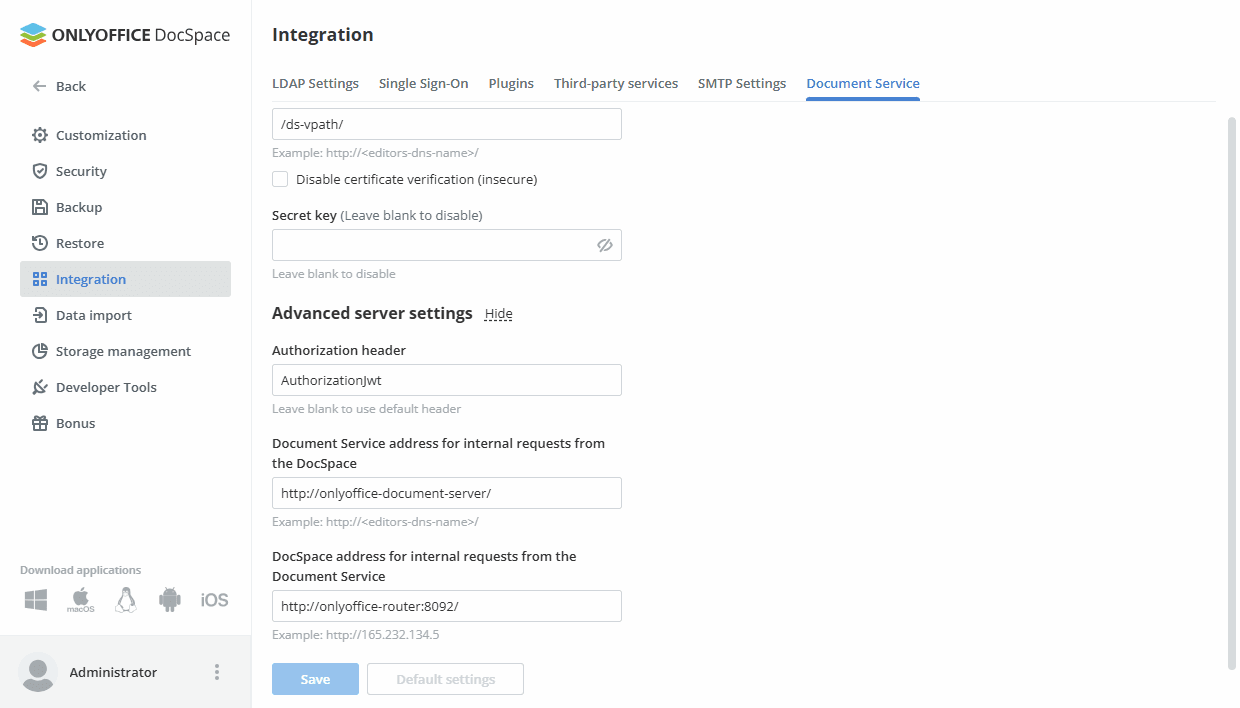
After extensive observation and testing, I found that in versions 9.2 and later, the aforementioned issue occurs directly upon the first creation and startup of the container. Installing version 9.1 first, followed by upgrading to version 9.2 or higher, temporarily resolves the issue. However, if the configuration shown in the image below is not manually configured, all configurations will disappear after a container or machine restart, causing the problem. Manually re-entering the configuration shown in the image restores normal operation, allowing for restarts without recurring the issue.

Hello,
If you don’t mind, I will join this thread as well.
The DocSpace is out-of-the-box portal solution where the Document server is already integrated. This is why the described situation seems unusual.
Is it possible to run a test? Please run a completely fresh installations without your changes in the installation script (also, we’ve released Document server v.9.3. Please download fresh installation script).
Will the situation with the lack of Document server integration reproduce?
If so, please collect entire DocSpace logs folder (/var/lib/docker/volumes/onlyoffice_log_data/_data)and make a screenshot of the Document service integration page while clicking ‘Save’ button.

Hey Alexandre, thanks for the reply. Today I did a clean install of the latest docspace version 9.3.1.1 on Debian 13, using Docker. The previous problem no longer occurred; the editing page opens normally after restarting the virtual machine, but a new problem has appeared.

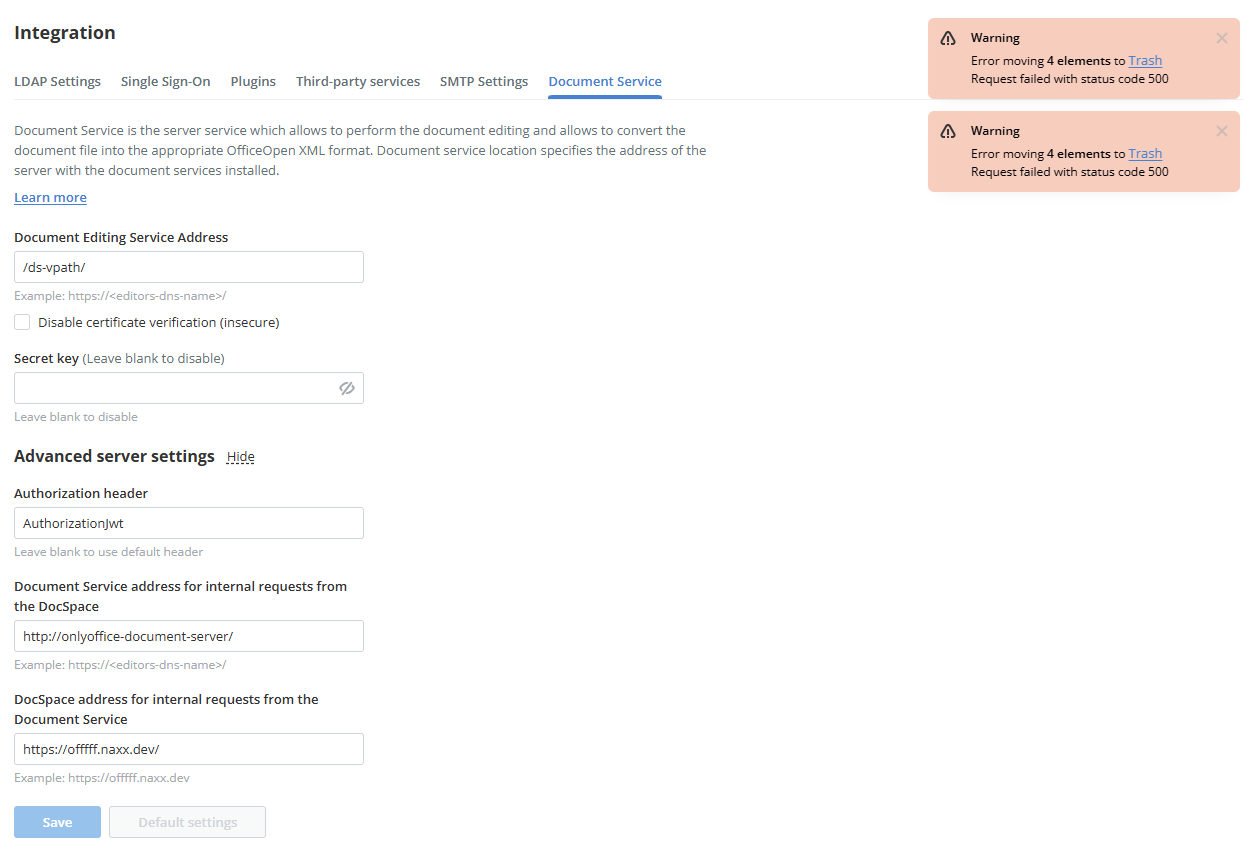
Whether it’s the sample files in the default personal space or files uploaded by myself in the public room, deleting them results in a 500 error. I’ve attached screenshots.

Note: The DocSpace address for internal requests from the Document Service option in the screenshot is the default setting. I also tried changing it to http://onlyoffice-router:8092, and it saved successfully, but the problem persists. Also, I can’t upload zip files, please tell me how to send /var/lib/docker/volumes/onlyoffice_log_data/_data.

Hello @azip52
Sorry for the late reply. You can upload logs (please reproduce the issue with deleting files first) to any external storage, and provide us with a download link. We’ll check out the logs.

@Alexandre here is the log
https://drive.google.com/file/d/1kvv5VhY3UQcGLVPJjHWDEoU4euIvNb61

Hello @azip52
Asc.Files.log file contains such entries:
RabbitMQ.Client.Exceptions.ConnectFailureException: Connection failed, host 172.18.0.27:5672

Please make sure that RabbitMq contrainer is running (run docker ps command). Also you can check container logs: docker logs onlyoffice-rabbitmq
If it’s necessary, try to restart that container. Please let us know the result.