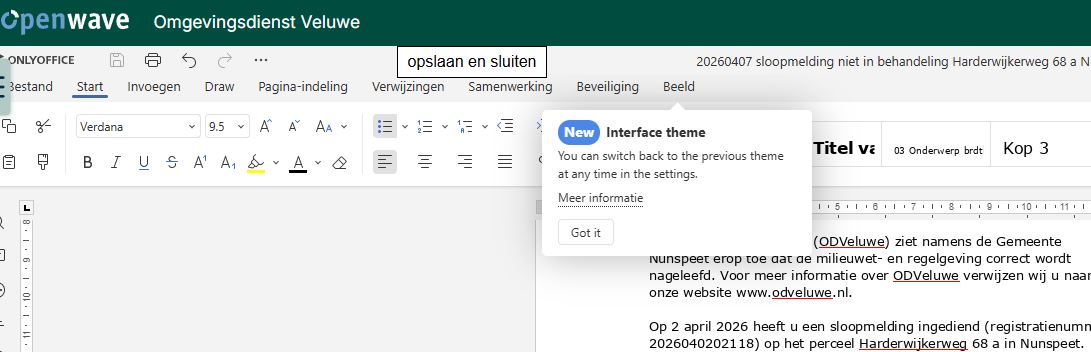
I’d like to know how to disable screentips in my workspace
Since the last update I keep recieving screentips, can I turn this off?
I’d like to know how to disable screentips in my workspace
Since the last update I keep recieving screentips, can I turn this off?
Hello, @jos !
Could you please send us a screenshot of the screen tips you’re referring to and specify exactly where you see them (in the editor or in the portal interface)?
Once we see how they appear and where they are located, we’ll check whether they can be disabled and provide you with the appropriate instructions.
Thank you for the screenshot; it clarifies the situation. In Workspace, this message is expected to appear only as a short onboarding hint after the update, not continuously.
To understand why you keep seeing it, could you please check and let us know:
This will help us check the situation.
Because of your question if i clear cookie/cache or use private/incognito, and the fact I use private/incognito, I might think the fact I use private/incognito is the problem. Still isnt there a sollution to stop this, for instance by selecting you dont want ‘hints’?
Yes, in your case the repeated pop‑up is caused by working in private/incognito mode: the browser does not keep local data between sessions, so the editor cannot remember that you already clicked “Got it” and shows the tip again.
We already have an internal request on this topic — to add an option to completely disable such onboarding tips on first start. Your report has been linked to this request so your case is taken into account.
At the moment there are no exact timelines for this change, but if there are any updates or the option is implemented, we will update this thread.