Hello,
Could you please consider adding an option to delete pages based on a specified range?
For example, there is a large PDF files with 100 pages and I only need to keep the first 10. Currently, deleting 90 pages one by one would be time consuming.
It would be great if You could add option to specify a range. I see two potential ways:
- Delete Pages in Range: Allow the user to specify the pages to be deleted (for example from 11 to 10).
- Keep Pages in Range (Delete Outside): Allow the user to specify the pages to be kept (for example users sets from 11 to 15 and everything else will be deleted).
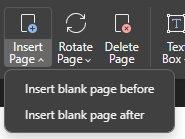
It could be potentially implemented using ^ for Delete Page just like it’s in Insert Page: