Example file is here: Google Sheets wird geladen
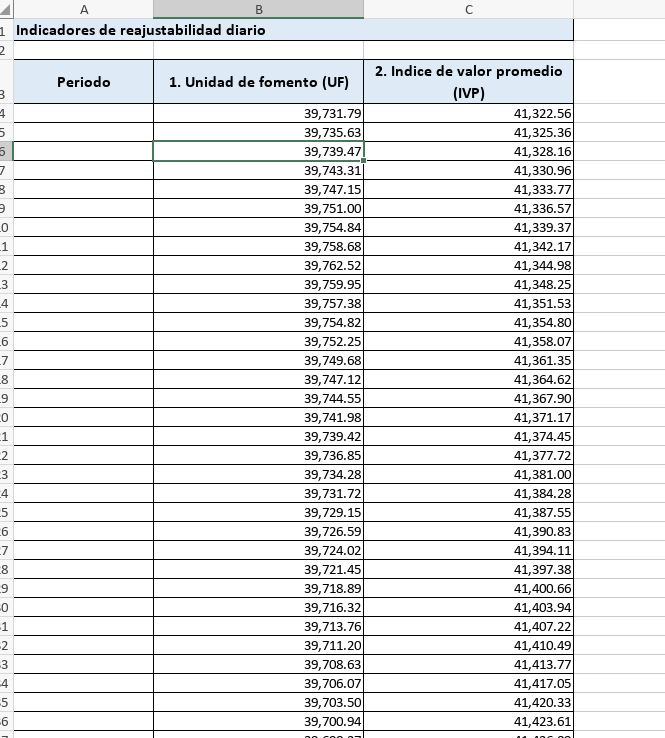
The date value is in cell B2.
Opening in MS Excel will show a date value, but opening it in OO will not.
Hello @Tobias
Could you please record a video file with your test? I have checked the provided file on the K8s Document server (v.8.1.1), all things are OK.
We need the exact usage scenario to check it out.
Bug is still present in version 9.3.1.8. Fields have the following format:
2026-01-01T00:00:00.000
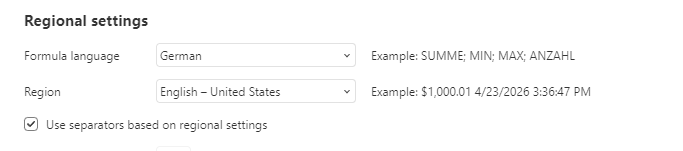
It seems to be related to regional formatting, Setting the region to US and reopening the file does show the fields.
The weird thing is that after changing the region back to one that uses coma for decimal separator, the file still opens correctly after it was opened once with US locale. Even though the file was opened in read only and not saved.
Hello @Tobias and @Quaint39
This is a really old thread. I believe we need to start from scratch.
Please provide us with a test file and exact steps how to reproduce the situation, we’ll check it out. If it’s possible, please record a videofile.
Also please let us know your exact Document server version and the installation type (docker, packages, exe).
I don’t have excel to generate a test file, and when I try to generate one with libreoffice it changes “2026-01-01T00:00:00.000” to “2026-01-01T00:00:00,000” and that shows up correctly in ONLYOFFICE.
The Workaround described above (changing the locale setting and reopening the file) seems to work on Windows, but not on MacOS.
This is just using the standalone ONLYOFFICE programs with local files, no document server.
Exactly. Digging further into this, the problem occurs when the date is saved in ISO8601 format in the excel file. It can also be saved as numerical value, but in my example the generated excel file uses text in ISO8601 format.
Now, the ISO8601 standard seems to allow both “.” and “,” as decimal separators, but OO only reads it correctly if it matches its locale settings.
I changed them in advanced settings, but this only shows up when you have a file open.
There is also a global setting, but it’s named “Interface language”. Not sure if this affects locale setting too. Also, it seems to behave differently on windows and on MacOS. I’m trying to replicate the “fix” by changing the settings on a Mac now and I can’t get it to work the same way it worked in windows the other day.
Hello @Quaint39
I’ve downloaded file from the provided link, but all things are OK. Could you please share the exact steps to reproduce the issue? Also, let us know your regional settings in the app and the app version you’re using.
We’re looking forward to your reply.
Hi @Alexandre you can see the problem in the screenshot you uploaded. Column A has the date time data that is not shown in OO. Open the file with another office suite and you’ll see the values.
@Tobias and @Quaint39
Thank you so much for the provided data!
We have found a bug in the described scenario, we have started working on it. I will update this thread once we have something to share.