CSV preview now always working

Do you want to: Suggest a feature
OS version: Windows 10
App version: 9.0.3.29 (x64 exe)
Downloaded from: ONLYOFFICE website

Hello,

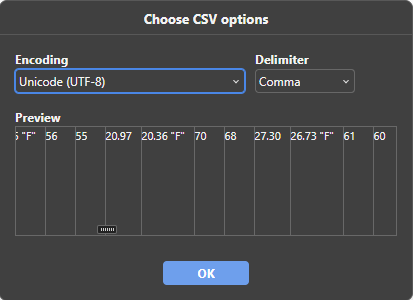
I found that on some csv files the preview is not working correctly:

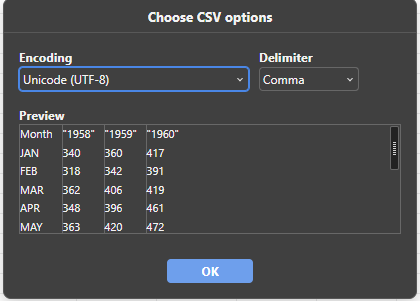
Generally, it looks like this (we can see headers and rows to verify whether the correct delimiter was applied):
image

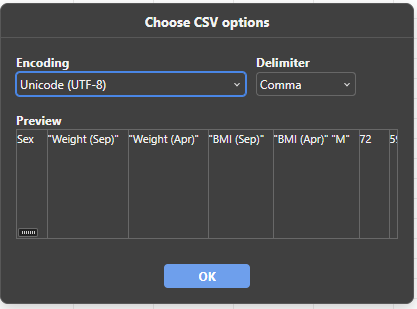
However, for following file it’s not working correctly (in preview all values are considered as headers):

freshman_kgs.csv (1.8 KB)

Here is preview:
image
image

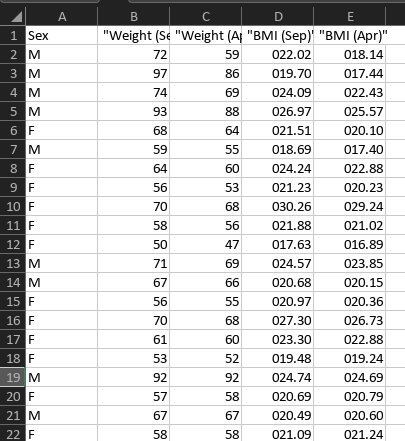
But after clicking ok, it do not match the preview we seen earlier:
image

Best Regards,
dedoci

Hello, we are currently analysing the issue, please wait

Conclusion - The problem is that, in addition to the comma delimiter, the file also contains spaces. As a result, the algorithm gets confused during file parsing.
We will think of ways to fix it on our side. I will notify as soon as the version with the fix is released.
Sorry for the inconvenience

Hello,
We have released Document server v.9.1. This release contains a fix for described situation. The desktop app will be available shortly.