OS: Ubuntu Noble (25.04)
OnlyOffice: Community version 9.4.0.129 (x64 snap)
Hello,
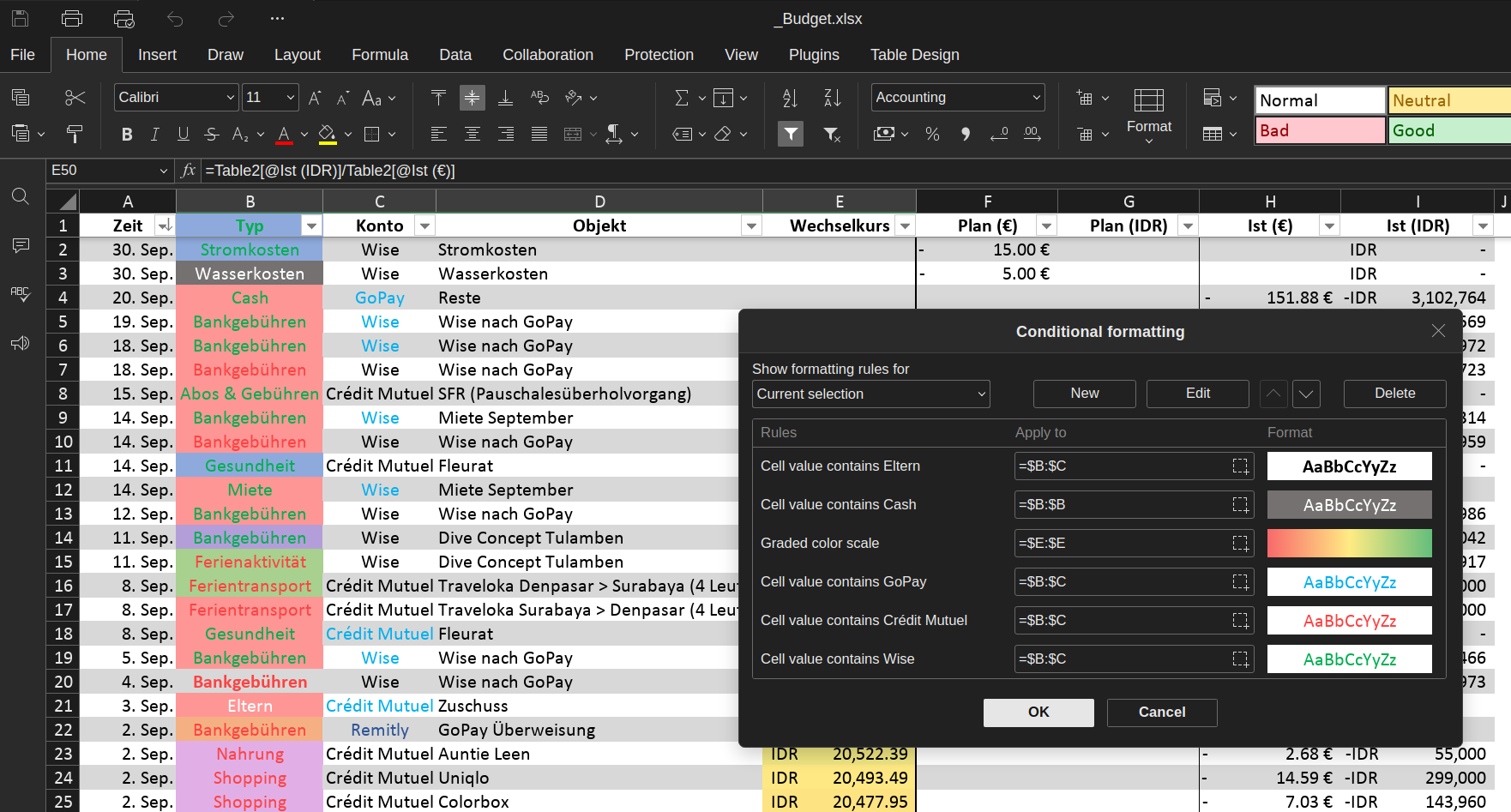
I’m making a budget sheet, and I added very simple conditional formattings rules. The value and colour scales ones work perfectly, but the text-based ones bug after reopening the file. The rules are really simple (contain text) and the file is quite lightweight (83.4 kb, only three sheets with two graph each, but it started lagging with only one sheet), so I hope it’s not due to a computation limitation otherwise I’m cooked.
Below my rules and the (unexpected output). Some help on the subject would be greatly appreciated! My data is filled in a table but the references are always given in absolute references, not table-relative references or named-references
Basically the Typ (B) column should have its background colour change depending on the content, and the Konto (C) column should be coloured based on the text within, but here everything is inconsistent. II added the colour scale rule to show that this at least works perfectly haha. Also no rules should overwrite another as all are mutually exclusive. I checked that there are no stray rules anywhere, and I made sure the cells in B:C are of the text type, so I’m kinda at my wit’s end here.
Help would be greatly appreciated,
Thank you in advance,
Update: I investigated the .xml files, and it seems that there’s a bug in the rule writing within the xml file (in filename/xl/worksheets/worksheetXwith a stray FF that gets appended to the rgb code, but not to the colour manager widget (hence why the rule appears ‘fine’ despite clearly malfunctioning). I don’t know how the replacement colour is picked though, but it seems that the colour picked is not random, because it chose existing custom colours (I had used a custom pink for instance).
Below the code for one such rule (should colour cells containing “Miete” in 8EAADC):
<extLst>
<ext uri="{78C0D931-6437-407d-A8EE-F0AAD7539E65}">
<x14:conditionalFormattings>
<x14:conditionalFormatting>
<x14:cfRule type="containsText" priority="32" text="Miete" id="{2EEA9A65-C7E8-41C4-96C6-5B98E992E148}">
<xm:f>NOT(ISERROR(SEARCH("Miete",B2)))</xm:f>
<x14:dxf>
<font>
<color theme="0" tint="0"/>
</font>
<fill>
<patternFill patternType="solid">
<fgColor rgb="FF8EAADC"/>
<bgColor rgb="FF8EAADC"/>
</patternFill>
</fill>
</x14:dxf>
</x14:cfRule>
<xm:sqref>B:C</xm:sqref>
</x14:conditionalFormatting>
The expected value for fgColor and bgColor is rgb=”8EAADC”, not rgb=“FF8EAADC“. My guess is that the conversoin from 6-digit to 8-digit hexadecimal is erroneous and prepends a FF. This pattern is recurrent throughout. I don’t know why the conversion is here (I don’t think we can change the alpha channel?) nor why it doesn’t appear on the coulour manager widget.
Hi @hdreyfus, welcome to the community!
Thanks for the report. About the FF part — that’s most likely just the alpha value, so FFBEAADC should be the same color as BEAADC. We’d like to try this on our side, could you help with a few things:
- The .xlsx file
- When you made the rules, did you select a range like B2:C50 and later change Apply to to B:C, or used B:C from the start?
- Was the file created in ONLYOFFICE, or in Excel/LibreOffice first?
- Are the colors correct before you close the file, and only wrong after reopening?