Report a bug
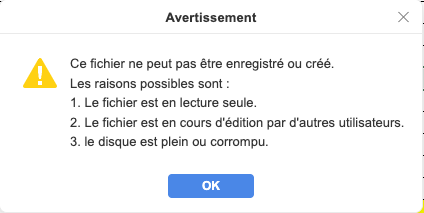
After upgrading to 9.2 on MacOS, some files (Words or excels files) on my OneDrive can’t be save after a modification with an error window saying :
This file can’t be saved or created
Possible reasons are :
File in Read Only
File used by another user
Disk Full
But, if i a open the same file with the 9.1 version of OnlyOffice, the file can be saved normally.
This is not related to OneDrive because on my other Mac, i have the same error with files on my iCloud Drive.
OS version: MacOS 26.1
App version: 9.2 (French)
Downloaded from: ONLYOFFICE website
Additional information:
Find my screen capture below (in french)
Hello @g.aubry
Can you share more information on how either OneDrive or iCloud drive is connected to your macOS?
Hello,
I used it the normal way.
Both are connected with my accounts.
All my files are stored and synced locally then.
Can you share a guide that describes process of connecting a storage to local system? I would like to run some tests.
1 Install OneDrive or Google Drive or connect iCloud drive
2 Login with your username and password
3 open a XSLX or DOCX files
4 make some modifications and save it
5 You may have the message that it can’t be saved
I’m actually testing too on a brand new Macbook Air just completely formatted.
Thanks. May I also know whether saving of local files works or not? Practically, I am referring to the files located right on the device.
Hello,
Yes local files can be saved. on Desktop or on local drive for ex
Regards,
Thanks. Do I understand correctly that files, for instance, on iCloud Drive are accessed directly from Finder?
Hello,
Even with the lastest version, the error still occured.
Yes, files on OneDrive or iCloud drive are fully downloaded on my Macs (offline files)
The error occur even if i tried to save a files directly on another folder on my Mac (Drive excluded)
I was unable to reproduce the behavior as it is, but possibly I am missing some steps. Can you record a video demo with the issue?
In terms of test, may I ask you to remove Desktop Editors from the device and install again anew?
Hello,
Here is a recorded video of my issue.
Before my test, i completely deleted OnlyOffice on my Mac and all files and folders affected.
OnlyOffice g.aubry screenrecording
As you will see, the issue is not on 9.1 version.
Regards,
Thank you for the video. We are trying to reproduce the issue from our end. I’ll let you know about the results or ask you for additional information.
UPD: Do you have Apple Silicon-powered device? Does the issue produce with every file or a specific one?
@g.aubry, do you have any news in that regard?
Sorry for the delay.
Yes, with all files.
I just re tested with the 9.3 version. I opened an XLS file on my OneDrive and have the issue. Even if i tried to save my files on a USB key, the error occurs.
I saved my file, had the error. i check and a files is created without my last modifications.
Sorry for the delayed response. We have just released new version 9.3 of Desktop Editors. May I ask you to update and check the situation again?
Hello,
Unfortunately, the issue is still there on 9.3 version. I just tested yesterday 
Regards,
The issue is still there on 9.4. With 9.1 all is working fine.
All existing office documents stored on a Drive can’t be save after a modification.