Do you want to: Suggest a missing feature
OS version: Win 11 Pro
App version: 9.3.1.8 (x64 exe)
Downloaded from: ONLYOFFICE website
Hi Team,
I was trying to move an object’s anchor, something I used to do on MS Word, but does not seem to be possible here in OnlyOffice.
The call-out is anchored to the pilcrow ( ¶ ) above the screenshot (following).

But I wanted the call-out to be anchored to the image like the other two call-outs (following)
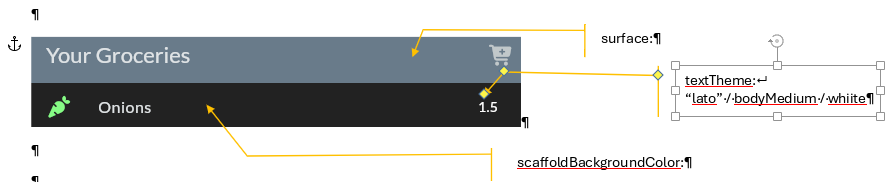
With all call-outs anchored to the screen-shot, they move together during document content flow.
With MS Word, one could use the mouse pointer to drag the anchor to the desired position. OO does not appear to allow the anchor to be selected for moving.
So, I am suggesting you may consider facilitating this edit function.