Cannot Add Ollama Local Provider Invalid URL Error

OnlyOffice 9.2.0.100
Linux Flatpak

I tried the new AI capability.

  1. I go to AI Agent
  2. Connection
  3. Add provider
  4. I select Provider = Ollama
  5. I give it a name (using the models or a generic name, none work)
  6. I set the URL to anything (tried numerous options) such as localhost:11434 localhost:11434/api/ localhost:11434/v1 and tried using the local IP (same machine) --NOTE: these are illustration of options tried
  7. I set API key to something generic (does not seem to have any effect)
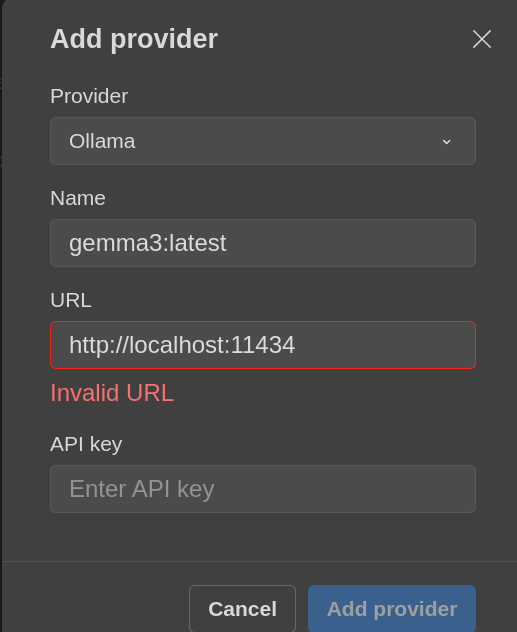
  8. When I select Add Provider button, I get a error Invalid URL.

Is anyone else seeing this problem with AI?

The Ollama instance is up and running (verified). I tried localhost or IP for the URL. I even tried another Ollama instance on a remote machine.

In every case, I get an Invalid URL Error and cannot connect the AI instance.

Hello @Shannon

Are you using AI plugin to connect Ollama in Desktop Editors?

Thank you.
I am not sure. I installed OnlyOffice as a Flatpak. I did not install any plugins that I am aware. From the settings, I just select AI Agent to setup. The AI Agent seems to just appear with a standard OnlyOffice install via Flatpak.

Do you host Ollama locally on your device? If so, please describe how it was deployed.

Thanks.
I just updated to Community version 9.2.0.100 (flatpak).

The issue, for me, persists.

The Ollama Instance is deployed as a Linux systemd service available to me anywhere on my internal network (non-routable IP).

Ollama exists (and I verified) at:

  • http://localhost:11434/
  • http://192.168.222.2:11434/

A test of Ollama shows the normal response: Ollama is running.

When trying to ssetup, I:

  • after re-boot, open OnlyOffice
  • from the main screen (no documents open), I see an AI agent option (left side)
  • Select AI agent
  • Select Connect an AI Model
  • Connection…Add Provider
  • Then add the inform,ation for Ollama.
  • I try localhost or the IP.
  • In all cases, I immediately get a red Invalid URL error and cannot add the local AI agent.

A screenshot shows:

Note: I have tried using moddel names, specific endpoints, etc. All seem, for me, to result in the Invalid URL. I have also tried many names and some ‘dummy’ API keys.

Thanks for looking at this. Like OnlyOffice overall.

UPDATE: I also poked around the OnlyOffice Plugins.

I opened Plugin Manager and saw the AI Plugin.
The Plugin suggested an Update.
I updated the AI Plugin.
I closed OnlyOfifce.
Reopened.
Still Invalid URL.

More Testing:

If it helps the Development Team:

I tried using a “fake” URL.

That is, I setup a fake endpoint at a real URL that I use to a website.
Say that URL is http://www.abc.com:11434 (This is NOT the real URL.)

When I cllick Add Provider, now the plugin appears to at least try to connect to the ‘fake’ endpoint.

My testing here was to ssee if the issue is the IP or a URL. My minimal testing suggests the plugin might simply be rejecting the numeric IP address as a priori invalid.

Could this be the issue? Perhaaps there is a URL validity check that rejects numerics such as straight IPs?

I also tried this with a clean install of OnlyOffice on a different system and using a different IP for the Ollama instance (this is completely seperate from the prior report).
Same issues. The URL is not accepted at all–http https IP localhost with endpoints without endpoints.

We have recently published a guide on how to connect Ollama to Desktop Editors:

The step 3.1 provides sample of OLLAMA_ORIGINS option that needs to be provided for correct work with Desktop Editors. Please try setting this variable for your installation.

Fantastic @Constantine. Thank you for the follow-up.

Summary

On a Linux sysstem, the OLLAMA_ORIGINS works for a local-to-the-machine model. In other wwords, this works iff the Ollama instance runs on the same machine.

** Linux Suggestion **
I placed the OLLAMA_ORIGINS in my BASH ~/.bashrc file to persist the variable after re-starts. Add the suggested OLLAMA_ORIGINS to bashrc (assuming BASH Shell), save, and then execute source ~/.bashrc.

** Use Case **
Muyuse-case is still not addressed–I say this politely. I have a dedicated Ollama server on my personal internal network. Assume: 192.168.222.6 This is NOT the same machine that runs OnlyOffice.

The dedicated Ollama machine offloads the Ollama usage from the working machine–the machine using OnlyOffice may also bee used for software development.

I still cannot get OnlyOffice to use the IP of a dediccated machine. If I try to use an IP (anything but localhost), I get the Invalid URL error.

** What I tried **
I tried several permutations including adding the IP to the OLLAMA_ORIGINS variable.

I also tried setting a mapping in /etc/hosts to create a host-alias for the remote/dedicated machine.

Only localhost seems to work.

I also checked the flatpack settings and confirm that OnlyOffice has network access.

THANKS for the improvement. At least this wworks with localhost.

1 Like

Generally, the problem can be also related to the port accessibility from other machine. Can you confirm that the port dedicated to Ollama on other machine is actually open?

hello i also have same problem in my windows , since i update the office to newest 9.2.1.43 , the ai agent can not use api via ollama, also the other provider just give little and old option of LLMs, no GLM4.7 no OPUS.

Yes. All necessary ports are open. 11434

Hello @qwert67

Have you consulted with the guide above to provide necessary options to Ollama?


@Shannon can you try curl http://<ip>:11434/api/tags from the device with Desktop Editors to see if it returns any contents? Possibly you need to additionally configure OLLAMA_HOST option. By default it binds to 0.0.0.0, thus working only from localhost.

Thanks @qwert67 .

I ran curl http://<ip>:11434/api/tags both from the same machine as OnlyOffice and from a SSH ssession.

Curl correctly produced results such as:

{"models":[{"name":"nomic-embed-text:latest","model":" CUT HERE

I ran curl http://localhost:11434/api/tags rom the same machine as OnlyOffice and got the same results:

{"models":[{"name":"nomic-embed-text:latest","model":" CUT HERE

I ran

echo $OLLAMA_HOST

and see no results.

However, your question gave me an idea but it did resolve the issue.

I added export OLLAMA_HOST=0.0.0.0 to the ~/.bashrc and ran source ~/.bashrc to activate the environment variable.

Running echo $OLLAMA_HOST
0.0.0.0

I also checked the systemd ollama service file and OLLAMA_HOST is set in the systemd config file.

All other serives connect to the Ollama instance ffine including APIs and openwebui etc.

However, testing with the OLLAMA_HOST set in ~/.bashrc immediately failed. Only localhost works. Even using the IP of the local instance fails.

This seems odd but may be closing on the issue. I added OLLAMA_HOST to .bashrc because I thought maybe OnlyOffice needed user-space variables and the systemd config would not necessarily be available to a user. This did not work for me and still fails.

0.0.0.0 binds Ollama to ALL network devices per the Ollama config docs, not just localhost.

I also checked and see that echo $OLLAMA_ORIGINS
http://,https://,onlyoffice://* is set in ~/.bashrc.

For me, OnlyOffice does not see any Ollama instance unless localhost (that specific reference) in the AI setup tool.

To correct:
above, there is a blank are. I ran echo $OLLAMA_HOST at first and no results in USER space.

On a whim, I used FlatSeal (an editor for Linux and Flatpaks).

I manually added Environment Variables:
OLLAMA_HOST=0.0.0.0
OLLAMA_ORIGINS= http://,https:// ,onlyoffice://*

Supposedly, this passes the ENV variables to the Flatpak instance.

I re-booted and then re-tried setting up AI and Ollama. No effect.

I am starting to think that maybe localhost is hard-coded into OnlyOffice?

I took a quick look at the AI Plug-in code. https://github.com/ONLYOFFICE/onlyoffice.github.io/blob/master/sdkjs-plugins/content/ai/scripts/engine/providers/internal/ollama.js

A quick assessment seems to indicate that only localhost is possible and appears hardcoded.

constructor() {
		super("Ollama", "http://localhost:11434", "", "v1");
	}

The code, again a superficial assessment, seems to copy/mimic other statically-referenced AI providers. That is, Ollama seems treated like GROK or ChatGPT. However, those providers have static URLs. The Ollama provider does not seem to have a constructor option where you can save anything other than localhost.

As the Ollama code simply calls the parent constructor, I do not see a way to specify a distinct URL for Ollama instances. (And this would require saving the URL somewhere and calling, if avialble, to override the default constrcutor using the hard-coded localhost.) With Ollama, since this is possibly self-hosted, the code must provide for other than localhost as I could have a locally-running Ollama instance on an IP or possibly a sub-domain/host (e.g., on Linux, mylocalollama in hosts maps to 192.168.222.171)

Again, a superficial review but I think this might be the issue that localhost is hard-coded.

Compare the Ollama.js script with any other provider and then go to the parent AI.provider.js and see:

class Provider {
		/**
		 * Provider base class.
		 * @param {string} name  Provider name.
		 * @param {string} url   Url to service.
		 * @param {string} key   Key for service. This is an optional field. Some providers may require a key for access.
		 * @param {string} addon Addon for url. For example: v1 for many providers. 
		 */
		constructor(name, url, key, addon) {
			this.name  = name  || "";
			this.url   = url   || "";
			this.key   = key   || "";
			this.addon = addon || "";
	
			this.models = [];
			this.modelsUI = [];
		}

The Ollama.js code might need to be revised to something like:

add a conditional to the super class.

const isEnvVarSet = process.env.OLLAMA_HOST;
if is_EnvVarSet

then call the new constructor in Ollama.js

class Provider extends AI.Provider {

constructor() {
	super("Ollama", "http://localhost:11434", "", "v1");
}

constructor(ollama_url) {
	super("Ollama", ollama_url:11434", "", "v1");
}

I might look at this in the morning.

The aded constructor is not ideal but might be a stop-gap to keep the code parallel to other providers but also allow injection of an environment var to set the path regardless of the initial provider setup–that is, the originl woul still say localhost but would be dynamically overidden if OLLAMA_HOSTS env var is set. Not at all elegant but a possible bridge.

The constructor you have mentioned is used like a template for the “Add AI Model” window, thus changing the values will simply correct the date for constructor.

Just to clarify the results of curl http://<ip>:11434/api/tags: do you have several machines? Asking, because I am a bit confused with the environment - whether there is a machine with Ollama and another machine with Desktop Editors so you’d like to connect Ollama from another machine via IP address, because there is no Ollama on localhost of the machine with Desktop Editors.

Thanks @Constantine . The code was just observation that localhost seems hardcoded.

==Setup Clarified==
Linux Machine A = Ollama machine running Ollama directly (NOT as a Docker) (machine not used much and a backup)
Linux Machine B = Ollama machine running Ollama via Docker instance

Both servers run ollama. Each is assigned a locally-routable IP. I include both because this might be what is causing confusion. It really doesn’t matter which. Both are accessible via the network. These are server machines running local ollama instances and used for AI stuff.

Linux Machine C = Desktop Editors installed (a daily use laptop) <–THIS IS USED TO RUN ONLYOFFICE DESKTOP

== Curl Results ==
Curl shows both ollama instances are fully available via the network.

I run curl on all three machines.

I run curl on Machine A. curl http://192.168.222.170:11434/api/tags This returns something like {"models":[{"name":"codellama:13b","model":"codellama:13b","modified_at":"2025- ... SNIP

I run curl on Machine B. curl http://192.168.222.171:11434/api/tags This returns something like {"models":[{"name":"nomic-embed-text:latest","model":"nomic-embed-text:latest", ... SNIP

I run curl on Machine C. There is no local instance of Ollama so no results.

I run the same curl statements above from Machine C and all return exactly the same information as posted above.

I hope that clarifies.

==Summary (not complaint, just observation from my perspective)==

  1. the AI Plugin only seems to handle same-machine, localhost instances of Ollama (with localhost hard coded)
  2. I do not see any alternatives in the code such as reading an ENV variable (such as reading OLLAMA_HOST) to override the default, hard coded localhost (and this may be risky but seems suggested by prior comments about setting ENV variables)
  3. I just observe that the constructors seem to affirm that only localhost as the hard-coded text localhost is accommodated right now

==Use-case==
Yet, one of the reasons to run ollama as a provider is the ability to run ollama on a machine and allow me to acccess ollama no matter which laptop I use. So I can setup a headless server dedicated to AI and access it for my use.

This use-case will likely become more common as memory, GPU, and disk drive costs continue to shockingly escalated–I can no longer afford to store ollama instances, with all their AI-models, on every system or to add a GPU card to every system to run ollama.

I am going to complicate more but…the posed use-case illustrates the limits. Even if I temporarily run an ollama instance on the laptop so as to use Desktop Editors and the current AI Plugin, the token-count for any reasonable usage exceeds/impairs the entire resources Machine C (the laptop). See my point? The use of AI in Desktop Editors is fairly intensive and not workable for me (due to disk space, GPU limits, and memory limits) on my laptop. Thus, the headless server as Machine B (and an older A) which off-loads this intensive product. Example: Say I use Desktop Editors and the AI plugin to summarize a two-page memo. This is over 500 words (and many more tokens) sent to the ollama instance and a fairly intensive work-load for a simple laptop.
1 Like