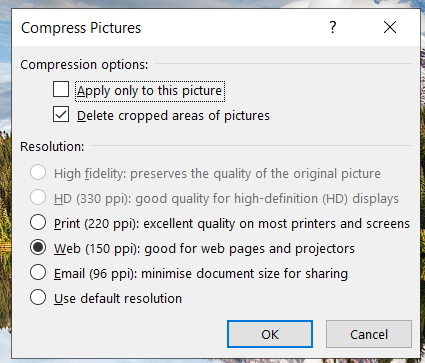
Could You consider adding Compressing Pictures Feature. In my opinion it’s pretty useful option in Microsoft Office, because it allows to quickly reduce the size of Presentation - thanks to that You can easily compress all of photos included in to document.
Do you want to: Suggest a feature
OS version: Windows 10
App version: 7.4.0.163
Downloaded from: ONLYOFFICE website
I have found out that this suggestion has been already registered so we’ve added your request to it. Unfortunately, I cannot provide any approximate dates when this feature would be available in the editors.
Just for your Info, it’s a feature that could really use a bump. I hit the same just a few days ago. In the end, the problem meant I took the whole document from onlyoffice to a terminal based mkdocs build process, because it was easiest to resize and replace the originals on command line. I had started with a >100MB document, and by sticking with markdown edits I had a ~8MB PDF. It wasn’t what I wanted, even if it might have helped me improve the docs pipeline.
tl;dr: I wanted a button instead I spent two hours switching the whole thing to not use a word processor and it was less hassle than changing all the pictures on a tiny laptop screen.
your product team would probably prefer people to have that button
can’t edit my post for some reason. when I wrote “it wasn’t what I wanted” I mean I originally had no intention of going down that route. I just wanted to make a simple manual as quickly as possible.