I’m running into a frustrating issue with OnlyOffice Docs when writing in Hebrew (RTL).
I often need to mix English words/numbers/acronyms (LTR) inside Hebrew sentences. In LibreOffice this works perfectly – the LTR parts just flow correctly without breaking the paragraph direction.
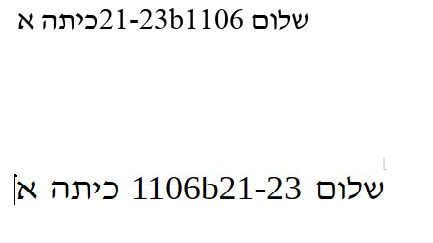
But in OnlyOffice, the LTR parts completely mess up the layout: the text doesn’t respect the mixed directions properly, and the whole line/paragraph looks jumbled.
I copy-pasted the exact same text between the two programs to make sure it’s identical.
Here are screenshots for comparison:
Is there any way to force OnlyOffice to treat certain words/parts as LTR inside an RTL paragraph?
Like some kind of override, special character, or hidden setting I’m missing?
I’m using the cloud version.
Tried changing paragraph direction/alignment but it doesn’t help with the bidirectional stuff.
Thanks in advance for any tips or workarounds – really want to switch to OnlyOffice but this is a dealbreaker for Hebrew writing.
I am also experiencing this critical issue, particularly when working with Hebrew documents. The lack of proper Table Direction control is a significant blocker for our workflow.
Expected Behavior:
Auto-Detection: When copying/pasting or creating an RTL table, OnlyOffice should detect the source direction and apply the correct table representation (columns ordered right-to-left).
Object-Level Control: When a table is selected, the RTL/LTR options in “Show Advanced Settings” should toggle the Table Direction (the visual order of columns), not just the text alignment within cells.
Context-Aware Settings: The RTL/LTR options should work at the Object level. If a table/object is highlighted, the setting should apply to the object’s orientation. If text is highlighted, it should apply to the text direction.
Actual Behavior:
When pasting an RTL table, OnlyOffice treats it as an LTR object.
Attempting to apply RTL properties from “Advanced Settings” only affects the text alignment inside the cells, while the table orientation remains reversed.
This issue is also highly prevalent in the Presentation Editor. Tables created in MS Office are displayed in reverse order in OnlyOffice, making it impossible to create professional, readable slide decks.
Impact:
This is a critical feature for any user working in Hebrew, Arabic, or other RTL languages. Currently, there is no way to fix the table structure manually within the editor once it’s imported or created.