Description
Many members of the community are waiting for native autosave feature to become available in Desktop Editors. While we are actively working on this improvement, yes, we are and we understand how important this is, I’d like to share with you a simple plugin for Desktop Editors that globally provides such option:
How it works
This plugin is based on regular office-js-api method Api.Save() that is supported by all editors (e.g. method for document editor), which means that the plugin works with document, spreadsheet, presentation and PDF editors.
Save triggers according to either a default interval of 5 minutes or your custom interval. Yes, you can set your own interval in settings, to do so just go to Plugins > Background plugins > Autosave > three dots > Settings and define your custom interval.
Note: you can only set whole positive number, if this rule does not apply, you will see a warning.
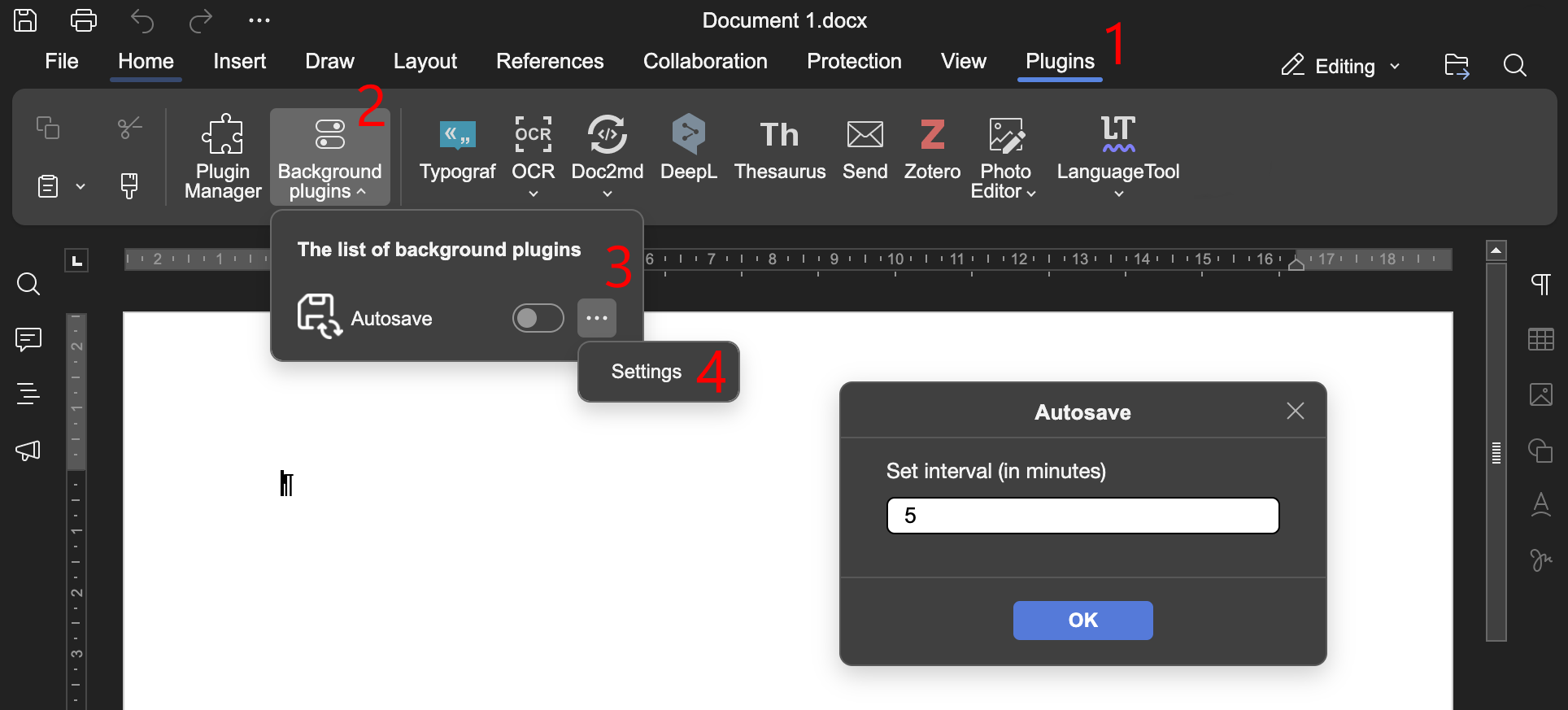
Plugin remembers your custom interval, there is no need to set it up each time you launch editors to work with your documents.
Quirks
-
Due to being a plugin, you must disable the plugin first in Background plugins to access Settings sub-plugin, change and apply your custom interval. Not much of a deal, but worth a mention.
-
Using low intervals with complex document may interrupt the workflow, because editor must process all changes to save them. Just keep an eye on it, if needed, increase the interval to keep working.
-
Also, you have to keep in mind that
Api.Save()method will prompt saving dialog for brand new files. Eventually, editor needs to save all of your progress somewhere, right?
All installation guides for Desktop Editors are mentioned in README of the repo.
If you face any issues, you can either post them here or open actual issue on GitHub.