When using the automatic msi installation option in a company, I’d like to specify the DocSpace or other cloud portal URL globally so that users don’t have to type it in manually. It could be done via some sort of msi install argument, or with traditional policy tools such as GPO in Windows. I don’t see any option for that right now - is there any way to achieve some sort of deployment automation like that?
Hello @3io4ugorhiucvb
We are checking the described scenario. I will contact you shortly.
Hello @3io4ugorhiucvb
Unfortunately, there’s no ready-to-go solution. The point is that the portal appears on the ‘Connect to cloud’ page when a user is authorized only. So we need to achieve authorization in this scenario.
Probably this work-around solution will be useful, try to add the address of your server to shortcut target parameter. The sample:
"C:\Program Files\ONLYOFFICE\DesktopEditors\DesktopEditors.exe" https://docspace.example.com
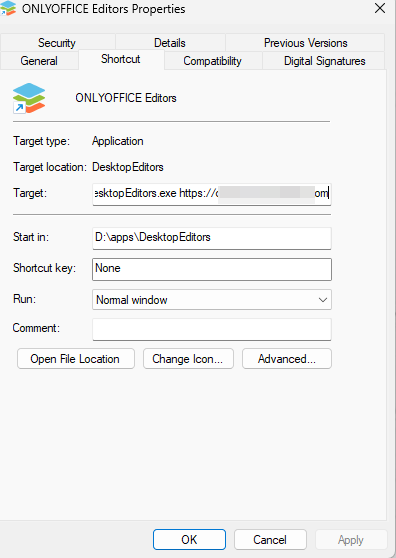
This way the user will see portal welcome page on the first run and the address will be saved once they are authorized. I’m not expert with GPO, but probably you will be able to create such shortcut for all users in your network.
I tried this as workaround for my needs, here are the results:
The concept seems to work nicely for the most part. If this is the first time user interacts with the shortcut, it redirects them to the login page, where they can login and later display the Docspace.
If the user lunches it again later, the tab displays Docspace immediately, so works nice. But the problem is, I think it doesn’t display the webpage properly:
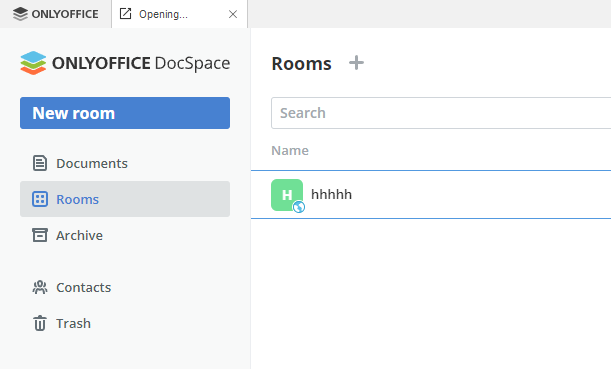
The tab is titled “Opening…” all the time. I can navigate rooms and other sections, but as soon as I click on some document to open it, it tries to open it in the external Internet browser, instead of the card in Onlyoffice program.
If I then close the Docspace tab and open it again from the “Connect to cloud” menu, everything works perfectly - no weird tab title and the documents open properly in separate tabs of Onlyoffice program.
I could provide some more data if you could point me to some kind of embedded browser log file.
Edit: I can also say that the weird “Opening…” tab title is visible no matter what web address is given, if you specify https://google.com you will see the same issue.
Hello @3io4ugorhiucvb
We’ll check that scenario. However, the first thought is using default shortcut once user is authorized. This way all things should work correctly.
Hello!
I don’t mean to bump this thread, but this was left in a hang with the vibe of “let us check into this and see.”
Was this something that was ever looked into? This seems to be a product of mass deployment, and it would be nice to integrate a cloud connection into the GPO/msi install process. Or, perhaps, a directory location inside which to drop a config json or something that it could auto pull from on startup?
I only need to push this to my workstations and have them link back to a single URL without placing that URL in the shortcut arguments. While that DOES make the connection that does persist, it leaves them at a landing page other than the default for desktop (With the 4 different file creation options at the top). That is the page my employees need to see.
Thank you! Perhaps I could make a new thread for this issue, but this thread literally inquires about it.
It never went anywhere, unfortunately.
The main reason, I think, is because the local msi installation is basically the same app as the web-server version (Workspace/Docspace), just served locally in a window. The main focus seems to be on the client-server software, which wouldn’t benefit from stuff like GPO and mass deployment.
That being said - I’m still waiting, maybe there will be something like this implemented in far future.
That makes me sad. It isn’t the same as it handles local files differently and dynamically in the context of the source than network files. The interface has a different home page on the desktop version as well, and it’s easier to strip out the collab stuff when certain sections of the organization don’t need it. I run a keycloak + kerberos backend for SSO through the online onlyoffice for some of the organization and tie into it using the cloud connection option for the hardwired users. I have it running very well for the older users who want simpler interfaces and would very much love to get a common automated method for deploying to blind pc deployments. This would help very much.
Currently I implemented a gpo msi install coupled with a run-once script triggered by security logon audit to execute the program at the particular URL as this thread suggests at user logon, and once the cloud connects through a background launch, terminates itself and leaves just the standard shortcut on the desktop. Clunky for a first time run, but it means I don’t touch the machine once I join it to the domain and walk away.
I just think this is a bad implementation for honestly? A simple feature. Let us configure it through json in the appdata folder so that we can push it via gpo. I know I know… community version stuff. But one can hope.
Thanks for the quick reply!
Hello @Dait_User and @3io4ugorhiucvb
We’re checking the current situation, I will update this thread as soon as possible.
Thank you @Dait_User and @3io4ugorhiucvb
We have added your request to internal tracksystem. We have started working on it.
I will update this thread once we have something to share.
Thank you so much. This really would be a very useful feature to all of us sys admins who need nearly every piece of software configurable pre-install, especially in a world that is moving more and more to work-from-home and remote location working. Getting to someone’s desktop to configure these things post-install is just becoming less and less feasible, and we would very much love to recommend your product and watch it grow!
1 Like