Do you want to: Report a bug
OS version: Windows 11
App version: 9.2.1.43 (x64 exe)
Downloaded from: ONLYOFFICE website
Additional information:-
Hi Team,
Writing up a manual with screen-shots, and trying to use a Callout box to point to an item in the screen shot.
Using » Insert / Shapes / Callouts / Line Callout 1
When I attempted to add an arrow to the callout’s pointer, I got the following result;
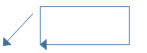
And while the arrow-head was on the callout’s pointer, it was also present on the box.
This is not quite what I was expecting. Pointer, Yes. Box, No.
I did chuckle to myself when I saw this; programatically, I can see what is happening and why, but it doesn’t suit.
I haven’t used MS Word for quite a few years, but I do remember that the callout did not include the arrow-head in the box part.
… so no arrows in callouts for the time being I think.

