Sometime in the past I inquired about having indicators (e.g., somewhere at the top of the current screen) as to (i) whether an open document is encrypted, and (ii) whether an open document has already been saved in its current state.
I recall that I received a reply that at least one of those (the ‘encryption’ status, I think) was going to be added in a coming update.
I am not aware that either has been added. If I have missed either or both, please inform me where to find them.
Regarding the indicator for document protection (visible without switching to the “Protection” tab), unfortunately, this hasn’t been implemented yet. I’d love to say it’ll be added soon, but we don’t have info on the version where it might land.
For the saved status, there is a notification like “All changes saved” that appears in the status bar at the bottom when everything’s up to date — that’s been around for a while.
Thanks, @Nikolas. I continue to hold the view that it would be a useful feature – i.e., just being able to glance up to the toolbar and see an icon indicating either ‘encrypted’ or ‘not encrypted’ status.
It could be achieved with a single icon that displays in one particular way for ‘encrypted’ and is either grayed-out or appears in some other way for ‘unencrypted’.
I haven’t seen an “All changes saved” status indicator in any of my documents.
Has it not been implemented for macOS?
There are a number of options at the page bottom, but nothing regarding “All changes saved”.
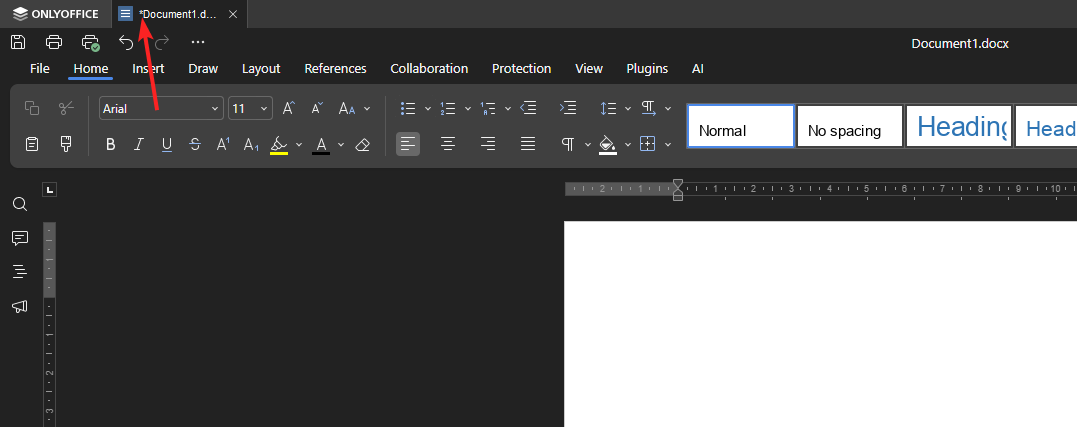
Regarding the “All changes saved” status indicator in the Desktop Editors: This notification is no longer displayed as text in recent versions. Instead, you can determine if all changes are saved by checking the asterisk (*) next to the document tab name. If the asterisk is absent, everything is saved. If it’s present, there are unsaved changes that need to be added to the document.