How can I do SUM(E3:E), ie. sum all cells below E3?
I can sum the entire column with SUM(E:E) but is there a way to apply a formula to a semi-infinite range ?
The use case is that I need the formula to be applied to new data as they are added at the end of the range without worrying about a possible limit.
Thanks in advance, I know this is probably a noob question but I couldn’t easily find how to do this (after some googling, searching this forum and asking an LLM).
In case it matters :
I’m using the desktop editor version 8.1.0.169 (x64 exe), downloaded from the website.
Hello,
You can use the following formula to achieve the desired result: =SUM(E4:E1048576)
1048576 is a maximum possible number of rows for Spreadsheet Editor (same as in Excel)
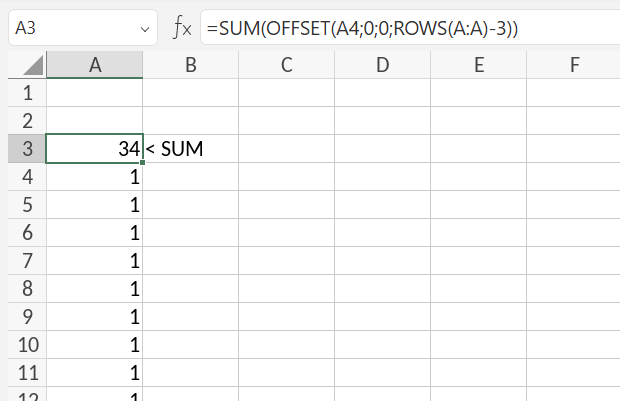
You can use OFFSET function to help with that. For instance, if I put the following formula into A3 cell and I want to calculate all values from below A3, then the syntax is:
=SUM(OFFSET(A4;0;0;ROWS(A:A)-3))
A4 here specifies starting point in the column A and ROWS(A:A)-3 indicates the offset in height of the range (column A). As a result, all values below A3 are getting summed: