I’m using the latest version of the Desktop software for Windows 11.
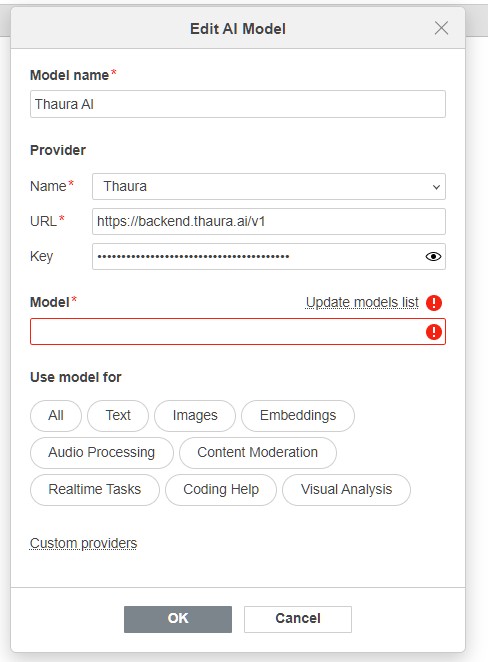
After succesfully adding the “custom provider” with a .js file, I get stuck on the “edit AI model” dialogue. When selecting Thaura as the provider, the field “Model” won’t populate, and clicking on “Update models list” gives the “failed to fetch” error.
Hi!
Thanks for the screenshot and details. Could you please try the following first:
In the Edit AI model window, set the URL to just https://backend.thaura.ai (without /v1), click OK, and then click Update models list again.
If the issue still persists after that, please send us a bit more technical information so we can investigate:
- Which ONLYOFFICE product you are using (ONLYOFFICE Desktop Editors, ONLYOFFICE Docs with a DMS, ONLYOFFICE Docspace).
- The exact product version.
- The Thaura custom provider
.jsfile that you uploaded (with the API key removed or masked).
With these details we’ll be able to see whether the problem is caused by the URL format, the custom provider script, or something on our side, and advise the exact fix.
hello Marix, thanks for reaching out.
Here are the answers to your questions:
OnlyOffice desktop editors, running under Windows 11
Community version 9.3.1.8 (x64 exe)
please find the contents of the .js file quoted below (cannot upload it as it is a .js):
‘use strict’;
class Provider extends AI.Provider {
constructor() {
super(“Thaura”, “https://api.thaura.ai”, “***********************”, “v1”, “thaura”);
}
}
‘use strict’;
const thauraProvider = {
name: “Thaura AI”,
apiBaseUrl: “https://api.thaura.ai/v1”,
apiKey: “MASKED”,
// Models available from Thaura
models: [
    {
        id: "thaura",
        name: "Thaura",
        maxTokens: 4096,
        temperature: 0.7
    }
],

// HTTP headers to include in requests
headers: function() {
    return {
        "Content-Type": "application/json",
        "Authorization": `Bearer ${this.apiKey}`,
        "Access-Control-Allow-Origin": "*",
        "Access-Control-Allow-Methods": "GET, POST, PUT, DELETE, OPTIONS",
        "Access-Control-Allow-Headers": "Content-Type, Authorization"
    };
},

// Send message to Thaura API
send: function(message, model, callback) {
    const url = `${this.apiBaseUrl}/chat/completions`;

    fetch(url, {
        method: 'POST',
        headers: this.headers(),
        body: JSON.stringify({
            model: model.id,
            messages: [
                {
                    role: "user",
                    content: message
                }
            ],
            max_tokens: model.maxTokens || 1000,
            temperature: model.temperature || 0.7
        })
    })
    .then(response => {
        if (!response.ok) {
            throw new Error(`HTTP error! status: ${response.status}`);
        }
        return response.json();
    })
    .then(data => {
        const reply = data.choices.message.content;
        callback(null, reply);
    })
    .catch(error => {
        console.error('Error calling Thaura API:', error);
        callback(error, null);
    });
}
};
// Export the provider
if (typeof module !== ‘undefined’ && module.exports) {
module.exports = thauraProvider;
}
Hi!
Thank you for the details. We have removed the API key from your forum message for security reasons. Please revoke this key on the Thaura side and generate a new one, just in case it was exposed.
As for the issue itself, the problem is most likely in the custom provider script format.
Your .js file should contain only one provider implementation. Please remove the separate thauraProvider object and the module.exports block, and keep only the class Provider extends AI.Provider definition, because ONLYOFFICE custom providers are expected to be defined through the Provider class inherited from AI.Provider.
In that class, please pass only the documented constructor arguments to super: provider name, base URL, API key, and addon. The extra fifth argument ("thaura") should be removed.
Also, please use only the base URL https://api.thaura.ai and do not append /v1 manually if v1 is already specified as the provider addon, otherwise the final request URL may be built incorrectly with a duplicated /v1 part.
After that, please re-import the corrected provider file, add the provider again, and test Update models list once more.
If the issue still persists after that, please send us the updated .js file (without the key).