Do you want to: Report a bug
OS version:
Edition Windows 11 Home Single Language
Version 23H2
Installed on 2023-10-12
OS build 22631.5624
Experience Windows Feature Experience Pack 1000.22700.1106.0
Device name EmilyGraceSeville7cfg-tablet2
Processor Snapdragon (TM) 8cx Gen 3 @ 2.69 GHz 2.69 GHz
Installed RAM 16.0 GB (15.4 GB usable)
Device ID 2B8A8C15-7DC1-4BD1-ADDA-C7331E897865
Product ID 00342-42339-83759-AAOEM
System type 64-bit operating system, ARM-based processor
Pen and touch Touch support with 10 touch points
App version: Community version 9.4.0.129 (x64 exe)
Downloaded from: Chocolatey Windows package manager
Steps to reproduce
- Add paragraph and shape behind it
- Press Enter before paragraph → get shape moving
- Press Ctrl+Z
- Add border to the paragraph
- Try pressing Enter again before paragraph → get shape being stuck
Video
Bug reproduction video (watch from 0:21, my laptop was lagging, sorry)
Why it is a problem
Let’s say I want not only underline the header, but also add a rounded shape as a background. In this case I will need to move it manually I add text above.
Hi Emily,
I guess this is the sort of thing you were looking for?

The steps were;
- Create the Heading, or paragraph text
- Add the border
- Draw the shape around the text and border
- While the border is selected, set the wrap to “Behind Text”
I found that this seemed to be working okay. Any CR inserted prior to the decorated heading/paragraph forced then further down the page. There was no disconnect.
There are some factors that may cause a disconnect between the heading/paragraph and the decoration;
- In the shape’s (decoration) Advanced settings for position, if the vertical position was changed from paragraph to one of the alternatives. That would anchor it to another document element.
- The vertical size of the shape, could cause the anchor to be positioned on a different paragraph.
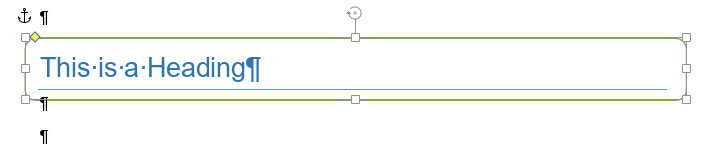
In the above case, while hidden characters are shown, you can see that the shape’s anchor is against the previous paragraph, it is indicated by the Pilcrow character (¶). This is okay, but if the shape (decoration) was anchored to the previous paragraph than shown in the screen-shot, then a CR inserted before the decorated paragraph may cause it to leave the decoration.
Have a look at what you are trying to achieve, and see if what I have highlighted here is of some help.
1 Like
Exactly! Thanks, I will try to follow your advice. 
I’ve tested how it works on Linux version of OnlyOffice (installed via snap). Here’s how: video. I find it’s confusing that in my case rectangle doesn’t get moved when I press Enter before the header.
And what I am also confused: why Normal style text was underlined, not the header. It feels odd.
I can see what is happening in your video.
When I did my screen shots, the anchor for the box was attached to the paragraph prior to the heading. This allowed for the insertion to work as the anchor was getting moved with each new line above,
In your instance;
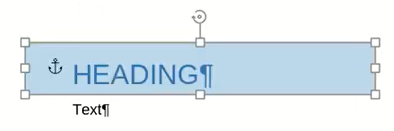
the anchor is on the same line as the heading text, thus insertion is pushing the text away from the shape and its anchor.
The closest I can get, to cover your instance is;

which is a Paragraph Border & Fill, and to prevent the Border & Fill from annexing the whole page width, I increased the right indent.
In respect to insertion above the heading, pressing Enter after positioning the cursor to the left of the “H”, a new line is inserted, and the Border & Fill covers both lines, but changing the style to the inserted line above back to “Normal” removes the Border & Fill leaving the header as displayed again.
The Border is a rectangle. No curves or other decorative elements, just Border colour, Fill colour, and Border width. You can also employ padding to increase the gutter between the text and border.
… I watched video quite a few times. I could not see a trigger for the following paragraph to acquire the bottom border attribute.
2 Likes
Thank you @DavidRGreen for the help you provided.
@EmilyGraceSeville7cf if there is anything else we can assist you with, please let us know.
1 Like