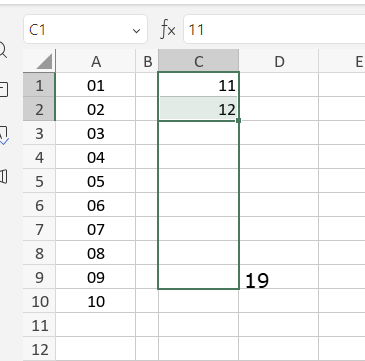
On spreadsheet, like exel or gspreadsheet
when we doing this (drag the number to bottom) we can know what number we’re at, (they had hovering number to tell what number will appear if we stop it right there) i think this is crucial so we can just drag and see what number will appear when we stop instead counting it manually or just re-drag it if they not enough or delete it if they exceed what we want
the example the feature was something like the image above, or you can just try it on exel or spreadsheet (google). i think this is was good quality of life update that we need
You’re absolutely right — having a hovering number preview when dragging to autofill in ONLYOFFICE Spreadsheets, would make things much more user-friendly! We’ve got a similar suggestion logged, and I’ve added you as an interested party. With your permission, I’ll tweak the topic title to: “Add display of intermediate values during cell autofill” for clarity.
I’ll notify you as soon as we have updates on including this feature in a future version. Thanks for your suggestion!