Do you want to: Report a bug
OS version: Win 11 Pro
App version: 9.2.1.43 (x64 exe)
Downloaded from: ONLYOFFICE website
Additional information:-
Hi Team,
I just happen to be doing some Tax calculations, and was using the Accounting number format, and I happen to notice that the currency symbol ( $ ), which should be left aligned in the cell had little miss-alignments for certain numbers.
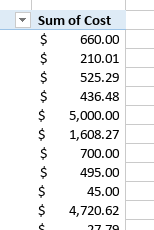
I notice that the degree of miss-alignment is due, for the most part, to the presence or absence of the comma (thousand separator) in the number.
I appreciate that it is a minor cosmetic issue, and I have already figured out a work-around, but in this instance, the Currency number format will suffice. But in a long column, the dollar signs look like a wiggling snake.
I’m not sure why the row with $45.00 is out-dented when the rest of the under $1000 entries are indented.
