# VLOOKUP function in multiply files
**URL:** https://community.onlyoffice.com/t/vlookup-function-in-multiply-files/7815
**Category:** Desktop editors
**Tags:** how-to-question
**Created:** [5 February 2024 03:53 UTC](https://community.onlyoffice.com/t/vlookup-function-in-multiply-files/7815 "2024-02-05T03:53:50Z")
**Posts on this page:** 12
**Page:** 1
### Author:  [@a.shliakhov](https://community.onlyoffice.com/u/a.shliakhov)
#### Post date: [5 February 2024 03:53 UTC](https://community.onlyoffice.com/t/vlookup-function-in-multiply-files/7815/1 "2024-02-05T03:53:50Z")
Do you want to: Ask a how-to question
OS version: win 11 pro
App version: 8.0.0.99
Downloaded from: ONLYOFFICE website
Hello!
I use the VLOOKUP function to work with tables, but I am faced with the impossibility of specifying a reference in one table to a column and a range in another table. How to do it?
---
### Author:  [@Constantine](https://community.onlyoffice.com/u/Constantine)
#### Post date: [6 February 2024 11:31 UTC](https://community.onlyoffice.com/t/vlookup-function-in-multiply-files/7815/2 "2024-02-06T11:31:09Z")
Hello @a.shliakhov
If I understand your scenario correctly, you want to reference the _ **lookup\_value** _ from another table to perform VLOOKUP function in separate array of cells. If so, then you can simply reference _ **lookup\_value** _ value of the function, for example, like that:
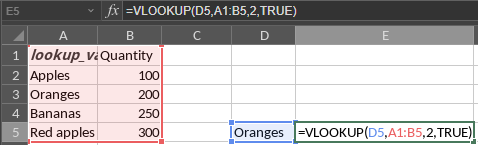
On this example, the _ **lookup\_value** _ value is referenced from the cell D5 which is not in the _ **table\_array** _ of cells A1:B5 and it returns the value 200 respectively to a E5 cell.
If it does not fit your scenario, please provide more information and if possible examples of your tables for better understanding.
---
### Author:  [@a.shliakhov](https://community.onlyoffice.com/u/a.shliakhov)
#### Post date: [7 February 2024 08:19 UTC](https://community.onlyoffice.com/t/vlookup-function-in-multiply-files/7815/3 "2024-02-07T08:19:40Z")
in your example, the actions are performed within one file. I need to use this function with data from another file.
---
### Author:  [@Constantine](https://community.onlyoffice.com/u/Constantine)
#### Post date: [9 February 2024 09:32 UTC](https://community.onlyoffice.com/t/vlookup-function-in-multiply-files/7815/4 "2024-02-09T09:32:57Z")
VLOOKUP formula uses these values:
| Argument | Description |
| --- | --- |
| _ **lookup\_value** _ | A value to search for. |
| _ **table\_array** _ | Two or more columns containing data sorted in ascending order. |
| _ **col\_index\_num** _ | A column number in the table\_array, a numeric value greater than or equal to 1 but less than the number of columns in the table\_array. |
| _ **range\_lookup** _ | A logical value TRUE or FALSE. It is an optional argument. Enter FALSE to find an exact match. Enter TRUE or omit this argument to find an approximate match, in this case if there is not a value that strictly matches the lookup\_value, then the function will choose the next largest value less than the lookup\_value. |
Do you want to reference one cell or array of cells of your table in source workbook to another workbook and use it as one of these values in VLOOKUP formula in destination file? Or you’d like to just reference a resulting value of the formula to another workbook (considering you have already declared this function in source workbook)?
---
### Author:  [@a.shliakhov](https://community.onlyoffice.com/u/a.shliakhov)
#### Post date: [9 February 2024 09:53 UTC](https://community.onlyoffice.com/t/vlookup-function-in-multiply-files/7815/5 "2024-02-09T09:53:04Z")
> [@Constantine](#):
>
> Do you want to reference one cell or array of cells of your table in source workbook to another workbook and use it as one of these values in VLOOKUP formula in destination file? Or you’d like to just reference a resulting value of the formula to another workbook (considering you have already declared this function in source workbook)
I need both options, but the first one is preferable.
MS Excel allows you to specify data from another file here ‘table\_array’
---
### Author:  [@Constantine](https://community.onlyoffice.com/u/Constantine)
#### Post date: [12 February 2024 10:52 UTC](https://community.onlyoffice.com/t/vlookup-function-in-multiply-files/7815/7 "2024-02-12T10:52:18Z")
I am looking into it, I will provide feedback as soon as any news come up.
---
### Author:  [@Constantine](https://community.onlyoffice.com/u/Constantine)
#### Post date: [13 February 2024 14:39 UTC](https://community.onlyoffice.com/t/vlookup-function-in-multiply-files/7815/8 "2024-02-13T14:39:54Z")
If you want to reference data from another workbook, you can use external links to the cell or array of cells as it is described here:
[https://helpcenter.onlyoffice.com/ONLYOFFICE-Editors/ONLYOFFICE-Spreadsheet-Editor/UsageInstructions/AddExternalLinks.aspx](https://helpcenter.onlyoffice.com/ONLYOFFICE-Editors/ONLYOFFICE-Spreadsheet-Editor/UsageInstructions/AddExternalLinks.aspx)
In case of [**VLOOKUP**](https://helpcenter.onlyoffice.com/ONLYOFFICE-Editors/ONLYOFFICE-Spreadsheet-Editor/Functions/vlookup.aspx) function, as well as other functions actually, you can reference data in such way:
1. Referencing _ **table\_array** _ from Source.xlsx file, for instance:
```auto
=VLOOKUP(A1,'[Source.xlsx]Sheet1'!A1:B6,2,TRUE)
```
1. Referencing _ **lookup\_value** _ from Destination.xlsx file:
```auto
=VLOOKUP('[Destination.xlsx]Sheet1'!A1,A1:B6,2,TRUE)
```
> **Note** : when referencing _ **table\_array** _ you may face `#REF!` error in the cell. In this case you will need to simply double click the cell with formula and then exit editing mode. We are aware of this issue, the work is already in progress.
In this case I’ve used links to different files in short format (`'[Destination.xlsx]Sheet1'`) which is used in case when both files are located in the same folder.
---
### Author:  [@a.shliakhov](https://community.onlyoffice.com/u/a.shliakhov)
#### Post date: [19 February 2024 05:39 UTC](https://community.onlyoffice.com/t/vlookup-function-in-multiply-files/7815/10 "2024-02-19T05:39:50Z")
I was able to establish a connection between the files, but I don’t understand what exactly this does, other than the ability to update the information in the “established connections” window 🙂
When selecting bound ranges, no references are added to the function. I have a video comparison of working in MS office and online office - MS allows you to use the function without unnecessary actions. [WeTransfer - Send Large Files & Share Photos Online - Up to 2GB Free](https://we.tl/t-nPd5WcZHYR)
---
### Author:  [@Constantine](https://community.onlyoffice.com/u/Constantine)
#### Post date: [22 February 2024 08:16 UTC](https://community.onlyoffice.com/t/vlookup-function-in-multiply-files/7815/11 "2024-02-22T08:16:02Z")
Unfortunately, such method is not available in Desktop Editors. We will take closer look at the video and discuss it internally. I’ll let you know the results.
At this moment, I’m afraid that you can only enter values manually.
---
### Author:  [@Constantine](https://community.onlyoffice.com/u/Constantine)
#### Post date: [28 February 2024 12:12 UTC](https://community.onlyoffice.com/t/vlookup-function-in-multiply-files/7815/13 "2024-02-28T12:12:52Z")
We have registered an enhancement suggestion to add possibility to reference external links to cells to destination workbook from source workbook by selecting them. Unfortunately, I cannot provide ETA at the moment. Once such feature is introduced, we will notify you.
---
### Author:  [@a.shliakhov](https://community.onlyoffice.com/u/a.shliakhov)
#### Post date: [29 February 2024 04:48 UTC](https://community.onlyoffice.com/t/vlookup-function-in-multiply-files/7815/15 "2024-02-29T04:48:18Z")
Thank you!
Waiting for it
---
### Author:  [@Immotay](https://community.onlyoffice.com/u/Immotay)
#### Post date: [27 October 2026 13:49 UTC](https://community.onlyoffice.com/t/vlookup-function-in-multiply-files/7815/16 "2026-10-27T13:49:23Z")
Greetings, I was wondering if there’s anyupdate on this matter? I’ve recently came accrosss ONLYOFFICE and tested it, but I did really miss the ability to reference ranges from other workbooks, not just from the same folder.