# Spreadsheet print bug: Hidden rows and columns print as blank
**URL:** https://community.onlyoffice.com/t/spreadsheet-print-bug-hidden-rows-and-columns-print-as-blank/20711
**Category:** Desktop editors
**Created:** [8 September 2026 19:35 UTC](https://community.onlyoffice.com/t/spreadsheet-print-bug-hidden-rows-and-columns-print-as-blank/20711 "2026-09-08T19:35:41Z")
**Posts on this page:** 17
**Page:** 1
### Author:  [@rsawoseyin](https://community.onlyoffice.com/u/rsawoseyin)
#### Post date: [8 September 2026 19:35 UTC](https://community.onlyoffice.com/t/spreadsheet-print-bug-hidden-rows-and-columns-print-as-blank/20711/1 "2026-09-08T19:35:41Z")
Steps to create:
1. Populate rows 1 to 5 and columns A to E of a spreadsheet with anything
2. Now hide one row (say row 3) and one column (say column C)
3. Select rows 1 to 5 and columns A to E as Print Area
4. Now, print to pdf
5. Result: the hidden row and column are printed as blank row and blank column
Operating systems tested: Windows 11, Fedora Linux
---
### Author:  [@DavidRGreen](https://community.onlyoffice.com/u/DavidRGreen)
#### Post date: [10 September 2026 00:28 UTC](https://community.onlyoffice.com/t/spreadsheet-print-bug-hidden-rows-and-columns-print-as-blank/20711/2 "2026-09-10T00:28:30Z")
Hi @rsawoseyin
I replicated your process;
1, populate Row 1 … 5, and Col A … E
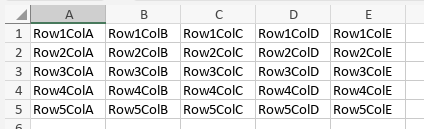
2,3 hide Row 3, hide Col C, and set Print Area
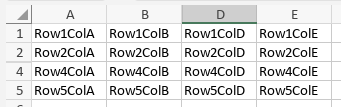
4,5 Print to PDF (and tried Export to PDF, no difference)
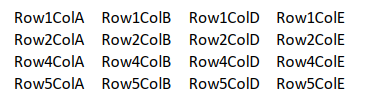
**result:** No distinguishable gap where Row 3 or Col C was.
What version of OnlyOffice are you using? I did the above on Win 11 Pro / OO v.9.4.0.129 (x64 exe)
Perhaps you could attach a copy of a spreadsheet from your system.
---
### Author:  [@rsawoseyin](https://community.onlyoffice.com/u/rsawoseyin)
#### Post date: [10 September 2026 08:01 UTC](https://community.onlyoffice.com/t/spreadsheet-print-bug-hidden-rows-and-columns-print-as-blank/20711/3 "2026-09-10T08:01:40Z")
I tried to upload my spreadsheet but the system says I am a new user and cannot upload attachments. I could send you the file privately.
---
### Author:  [@rsawoseyin](https://community.onlyoffice.com/u/rsawoseyin)
#### Post date: [10 September 2026 21:40 UTC](https://community.onlyoffice.com/t/spreadsheet-print-bug-hidden-rows-and-columns-print-as-blank/20711/4 "2026-09-10T21:40:48Z")
On your own spreadsheet, before hiding a row can you populate at least a cell in the row with substantial wrapped text that makes the row height grow to at least the equivalent of 4 rows. Then hide the row and then print.
---
### Author:  [@DavidRGreen](https://community.onlyoffice.com/u/DavidRGreen)
#### Post date: [10 September 2026 23:02 UTC](https://community.onlyoffice.com/t/spreadsheet-print-bug-hidden-rows-and-columns-print-as-blank/20711/5 "2026-09-10T23:02:23Z")
Okay, a change of test conditions, we’ll try again. New Spreadsheet created from scratch.
1, Populate spreadsheet;
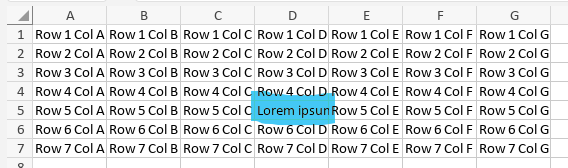
Note the highlighted cell, D5, with a **lot** of text, although most is cropped by the cell boundary,
2,3, Hide row and column containing D5, and set Print area;
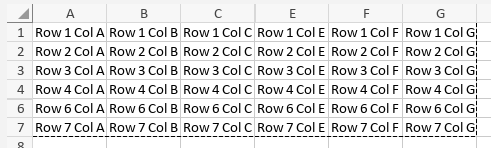
4,5, Render as .pdf and display
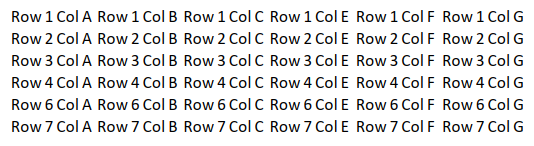
.pdf shows D5 hidden, and no excessive space is displayed.
So, something else to try; expose all the text in D5, then hide D5
1, D5 exposed;
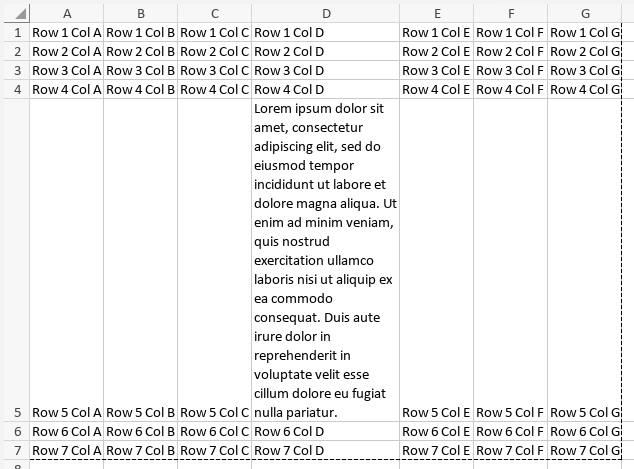
2,3, Row and Column for D5 hidden
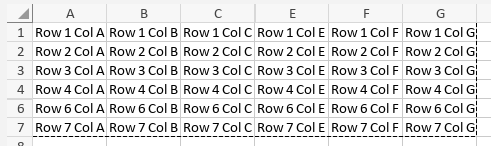
4,5, Render as .pdf and show
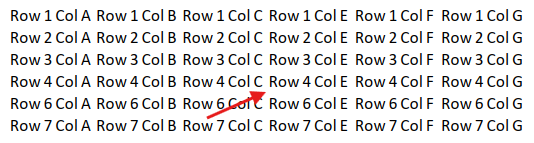
The arrow points to where D5 would be, and there is no excessive spacing again.
This would suggest that there is another factor to this issue.
And you have bypassed the matter of the version of OO that you are using.
It may still require that you place a copy of your spreadsheet in shared storage and provide a link. But before that, make sure you are using the current version of the software, and try again if you had to upgrade.
---
### Author:  [@rsawoseyin](https://community.onlyoffice.com/u/rsawoseyin)
#### Post date: [11 September 2026 08:28 UTC](https://community.onlyoffice.com/t/spreadsheet-print-bug-hidden-rows-and-columns-print-as-blank/20711/7 "2026-09-11T08:28:03Z")
Here is a link to the file on Google Drive:
> **[Google Sheets wird geladen](https://docs.google.com/spreadsheets/d/1B-gyBYNmxkmViPywdV_GEmQCE8VKYc41/edit?usp=sharing&ouid=101859764782048028684&rtpof=true&sd=true)**
>
> This Sheet is private
Rows 8 and 9 of the spreadsheet are hidden. Try print the sheet..
My system:
Windows 11
OnlyOffice desktop version 9.4.0.129 (x64 exe)
---
### Author:  [@DavidRGreen](https://community.onlyoffice.com/u/DavidRGreen)
#### Post date: [11 September 2026 13:56 UTC](https://community.onlyoffice.com/t/spreadsheet-print-bug-hidden-rows-and-columns-print-as-blank/20711/8 "2026-09-11T13:56:54Z")
Well, it has some layout and formatting that I have never had use, but;
In OO, the spreadsheet looked like;
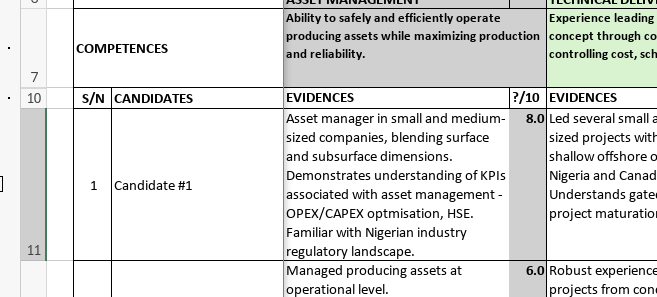
And the .pdf rendering looked like;
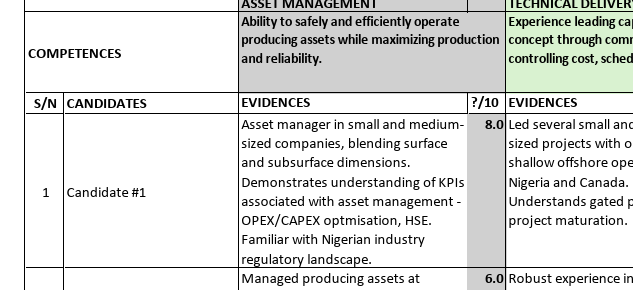
and between the two, I could see no significant column or row spacing issues.
From my perspective, that means either a platform (OS or Driver issue), or Software compatibility or corruption.
---
### Author:  [@rsawoseyin](https://community.onlyoffice.com/u/rsawoseyin)
#### Post date: [11 September 2026 14:56 UTC](https://community.onlyoffice.com/t/spreadsheet-print-bug-hidden-rows-and-columns-print-as-blank/20711/9 "2026-09-11T14:56:42Z")
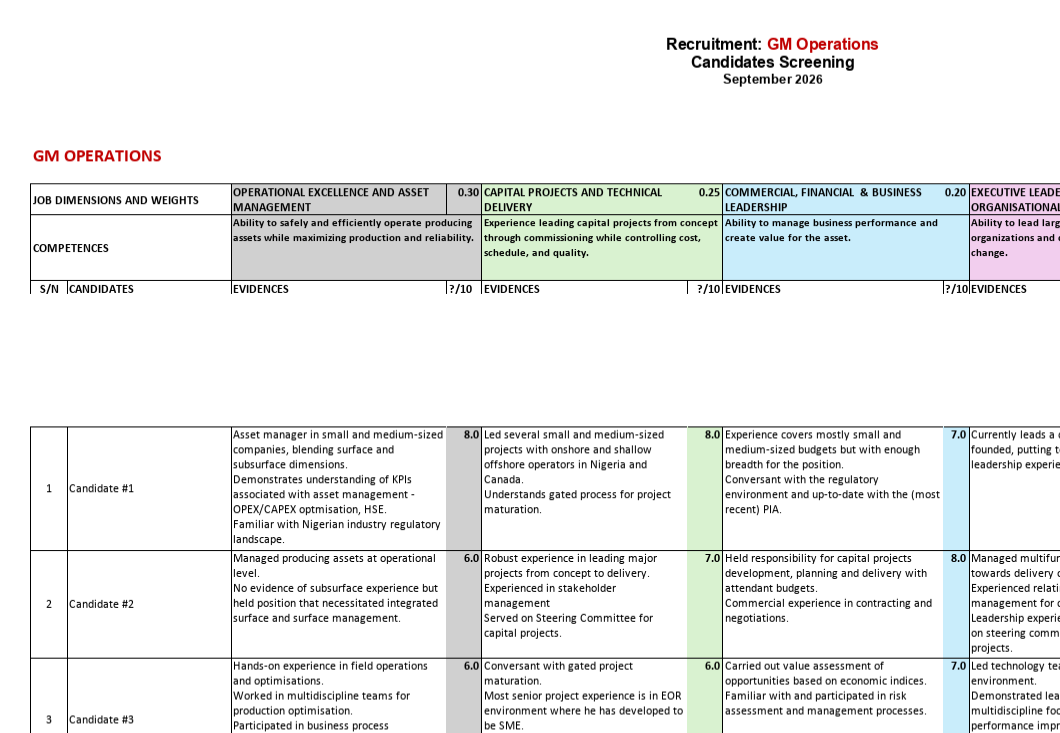
Here is what I discovered:
This screenshot is from the Print Preview and you can see the gap.
However, I have just discovered that when I actually print, the gap disappears.
---
### Author:  [@rsawoseyin](https://community.onlyoffice.com/u/rsawoseyin)
#### Post date: [11 September 2026 15:01 UTC](https://community.onlyoffice.com/t/spreadsheet-print-bug-hidden-rows-and-columns-print-as-blank/20711/10 "2026-09-11T15:01:46Z")
By the way, the same happens in Fedora Linux and the same OnlyOffice version which is actually my default OS on my dual-boot laptop. Something to do with the Print Preview. But I don’t have that problem with LibreOffice Calc.
---
### Author:  [@DavidRGreen](https://community.onlyoffice.com/u/DavidRGreen)
#### Post date: [11 September 2026 21:48 UTC](https://community.onlyoffice.com/t/spreadsheet-print-bug-hidden-rows-and-columns-print-as-blank/20711/11 "2026-09-11T21:48:22Z")
A member from the OnlyOffice support team may have an idea or suggestion.
I cannot replicate your issue, so resolution is impossible for me.
My only remaining suggestion is to address the platform issue I raised previously, which may be to uninstall OO and re-install from a fresh installation source from this site. Maybe even going as far as to remove all settings and configuration files prior to the installation step.
---
### Author:  [@rsawoseyin](https://community.onlyoffice.com/u/rsawoseyin)
#### Post date: [12 September 2026 08:49 UTC](https://community.onlyoffice.com/t/spreadsheet-print-bug-hidden-rows-and-columns-print-as-blank/20711/12 "2026-09-12T08:49:47Z")
Thanks for your help. Now that I know that the problem is only with the print preview and not the actual printing, I will manage.
Just to be sure: When you open my spreadsheet in OO and you click “Print”, can you confirm that the preview shown with the print dialog does not show the gap?
---
### Author:  [@DavidRGreen](https://community.onlyoffice.com/u/DavidRGreen)
#### Post date: [12 September 2026 14:38 UTC](https://community.onlyoffice.com/t/spreadsheet-print-bug-hidden-rows-and-columns-print-as-blank/20711/13 "2026-09-12T14:38:07Z")
Print preview and the resultant pdf appeared **identical** in every test.
---
### Author:  [@Marix](https://community.onlyoffice.com/u/Marix)
#### Post date: [14 September 2026 15:22 UTC](https://community.onlyoffice.com/t/spreadsheet-print-bug-hidden-rows-and-columns-print-as-blank/20711/14 "2026-09-14T15:22:21Z")
Hi @rsawoseyin,
Thank you for providing the XLSX file and the environment details.
We tested the file on Windows 11 with ONLYOFFICE Desktop Editors 9.4.0.129 (x64). In our test, Print Preview and the PDF generated via Print to PDF were identical, and no extra blank space for the hidden rows or columns was displayed.
To investigate the difference on your side, could you please provide the following:
1. A short screen recording showing the whole process:
2. A screenshot of the full Print dialog with all print settings visible.
_I have also raised your forum trust level, so you can now attach files directly to the forum. If a file exceeds the upload limit, please upload it to any cloud storage and share a link with us._
* * *
Hi @DavidRGreen,
Thank you for testing the file on your side and for confirming the results. We appreciate your help with investigating this case.
---
### Author:  [@rsawoseyin](https://community.onlyoffice.com/u/rsawoseyin)
#### Post date: [14 September 2026 17:49 UTC](https://community.onlyoffice.com/t/spreadsheet-print-bug-hidden-rows-and-columns-print-as-blank/20711/15 "2026-09-14T17:49:14Z")
> **[14.09.2026\_18.31.50\_REC](https://screenrec.com/share/4GXPLZd1JI)**
>
> Recorded with ScreenRec
Here is a screen recording of my print preview and print process. As I said earlier, when I eventuallyy printed into PDF from the print preview, that gap you see in the print preview disappears.
Considering that this problem also manifests in Fedora Linux on the same dual-boot laptop, I am just wondering if there is a hardware issue. The laptop is a GPD Duo 13 with AMD Ryzen AI9 HX 370 w/Radeon 890M. Could there be a quack in the processor or the graphics driver?
---
### Author:  [@Marix](https://community.onlyoffice.com/u/Marix)
#### Post date: [16 September 2026 14:14 UTC](https://community.onlyoffice.com/t/spreadsheet-print-bug-hidden-rows-and-columns-print-as-blank/20711/17 "2026-09-16T14:14:46Z")
Hi @rsawoseyin,
Thank you for the screen recording and the additional information.
We have reproduced the behavior using the XLSX file you provided. We have also found that resetting or clearing the Print Area removes the blank space from Print Preview.
We have forwarded this case to our QA team for further investigation and will update this thread as soon as we have more information.
---
### Author:  [@Marix](https://community.onlyoffice.com/u/Marix)
#### Post date: [21 September 2026 09:43 UTC](https://community.onlyoffice.com/t/spreadsheet-print-bug-hidden-rows-and-columns-print-as-blank/20711/18 "2026-09-21T09:43:13Z")
Hi @rsawoseyin,
Thank you for your patience.
This issue has now been registered in our internal tracker. Unfortunately, we do not have an exact ETA for the fix yet. We will update this thread as soon as we have any news.
---
### Author:  [@rsawoseyin](https://community.onlyoffice.com/u/rsawoseyin)
#### Post date: [21 September 2026 10:10 UTC](https://community.onlyoffice.com/t/spreadsheet-print-bug-hidden-rows-and-columns-print-as-blank/20711/19 "2026-09-21T10:10:28Z")
Many thanks to you and the OO team for taking this issue on board. I appreciate you a lot. As I said earlier, I will manage till it is fixed since it only affects the print preview.