# Provider not available error
**URL:** https://community.onlyoffice.com/t/provider-not-available-error/19771
**Category:** AI
**Created:** [14 May 2026 14:40 UTC](https://community.onlyoffice.com/t/provider-not-available-error/19771 "2026-05-14T14:40:27Z")
**Posts on this page:** 10
**Page:** 1
### Author:  [@zd\_admin](https://community.onlyoffice.com/u/zd_admin)
#### Post date: [14 May 2026 14:40 UTC](https://community.onlyoffice.com/t/provider-not-available-error/19771/1 "2026-05-14T14:40:27Z")
Downloaded amd64.deb version of ONLYOFFICE. Tried DeepSeek API in the document AI tab and it worked fine.
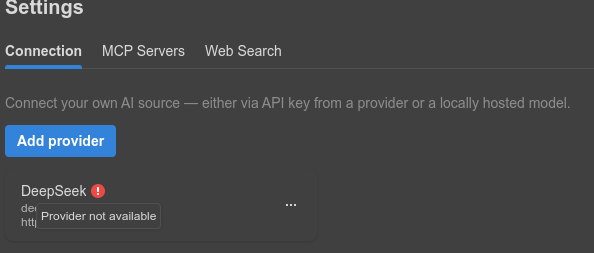
But when I added the same API key to the ONLYOFFICE AI Agent, it showed “Provider not available” error.
---
### Author:  [@Marix](https://community.onlyoffice.com/u/Marix)
#### Post date: [18 May 2026 13:14 UTC](https://community.onlyoffice.com/t/provider-not-available-error/19771/2 "2026-05-18T13:14:02Z")
Hello,
Thank you for your message.
To clarify the situation, please tell us which ONLYOFFICE product you are using exactly (for example, Desktop Editors, ONLYOFFICE Docs, DocSpace, etc.) and its full version number.
Please also describe how exactly you are trying to add DeepSeek to the AI Agent: which menu/settings section you open, which provider option you choose there, and at what exact step the “Provider not available” message appears.
---
### Author:  [@zd\_admin](https://community.onlyoffice.com/u/zd_admin)
#### Post date: [19 May 2026 15:17 UTC](https://community.onlyoffice.com/t/provider-not-available-error/19771/3 "2026-05-19T15:17:29Z")
At the time of posting the message, I was using the Desktop Editor debian version latest. I am unsure which version it was, considering 9.4 was released today.
I have since uninstalled it and reinstalled the flatpak current version 9.3.1.8 Desktop Editor (community version).
As for adding the AI, theres an AI Agent tab on the bottom left side right above the Settings button.
I click on it. Click on Add provider button. Select DeepSeek from the Provider dropdown menu. Enter “DeepSeek” as name. Enter API key. And then click on Add Provider button on bottom right.
And then I see the image I posted before. A red mark in front of the name. And when I hover the mouse over it, it says “Provider not available”.
---
### Author:  [@Marix](https://community.onlyoffice.com/u/Marix)
#### Post date: [25 May 2026 12:33 UTC](https://community.onlyoffice.com/t/provider-not-available-error/19771/4 "2026-05-25T12:33:35Z")
Hello,
Thank you for the details. The steps you described look correct, and DeepSeek is listed as an available AI Agent provider in ONLYOFFICE Desktop.
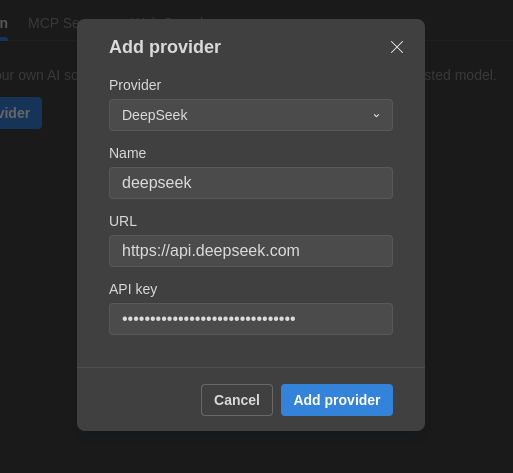
- Could you please send us a screenshot of the **Add provider** window exactly as you fill it in, with the **URL** field clearly visible and the API key **masked**?
- Please also let us know whether you are using any **proxy, VPN, firewall, DNS filtering, or antivirus/SSL inspection** on your computer or network, as these may affect provider availability.
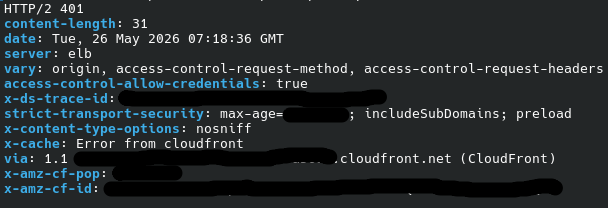
- Please also check from your computer whether the DeepSeek endpoint is reachable from the terminal.
On Linux, you can test it with:
`curl -I https://api.deepseek.com`
- And please verify that your API key is still valid on the provider side as well.
---
### Author:  [@zd\_admin](https://community.onlyoffice.com/u/zd_admin)
#### Post date: [26 May 2026 07:33 UTC](https://community.onlyoffice.com/t/provider-not-available-error/19771/5 "2026-05-26T07:33:05Z")
1. 
2. No proxy, VPN, firewall, DNS filtering, or antivirus. Just a standard Debian system.
3. 
4. The same API key is working perfectly fine inside the document AI plugin in the same debian and flatpak applications. It’s just the AI agent feature that’s giving the error.
---
### Author:  [@Marix](https://community.onlyoffice.com/u/Marix)
#### Post date: [1 June 2026 10:56 UTC](https://community.onlyoffice.com/t/provider-not-available-error/19771/6 "2026-06-01T10:56:01Z")
Hello,
Thank you for the clarification.
Could you please try one more test: when adding the provider in **AI Agent** , leave the **Name** field unchanged and save it as is?
If the same error still appears, please let us know.
---
### Author:  [@zd\_admin](https://community.onlyoffice.com/u/zd_admin)
#### Post date: [2 June 2026 14:47 UTC](https://community.onlyoffice.com/t/provider-not-available-error/19771/8 "2026-06-02T14:47:37Z")
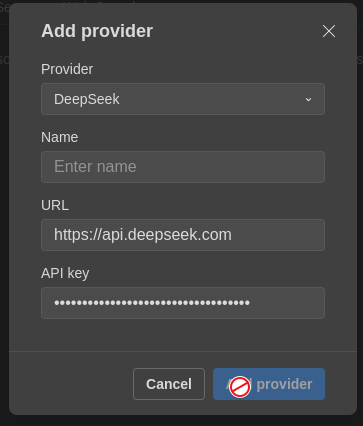
Default value of name field is blank. Cannot click on ‘Add Provider’ button without entering some name.
---
### Author:  [@Marix](https://community.onlyoffice.com/u/Marix)
#### Post date: [8 June 2026 09:59 UTC](https://community.onlyoffice.com/t/provider-not-available-error/19771/9 "2026-06-08T09:59:05Z")
Hello,
Thank you for your patience, and sorry for the delay.
We are currently checking this behavior on our side. As soon as we have any update or more information, we will post it here.
---
### Author:  [@zd\_admin](https://community.onlyoffice.com/u/zd_admin)
#### Post date: [8 June 2026 11:44 UTC](https://community.onlyoffice.com/t/provider-not-available-error/19771/10 "2026-06-08T11:44:37Z")
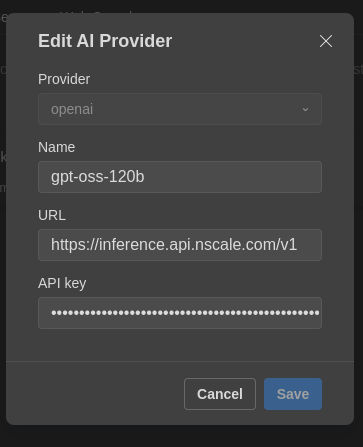
I tried another platform and got the same result:

---
### Author:  [@Marix](https://community.onlyoffice.com/u/Marix)
#### Post date: [9 June 2026 15:16 UTC](https://community.onlyoffice.com/t/provider-not-available-error/19771/12 "2026-06-09T15:16:08Z")
Hello,
Sorry for the delayed reply, and thank you for checking this on another platform too.
We checked this on our side. At the moment, AI Agent supports only a limited number of providers and models. Support depends on the provider and on how its API works, so not every provider or model is compatible.
DeepSeek is not working reliably with AI Agent at the moment, and this may change depending on updates on the provider side.
Also, not all models are supported yet. For example, on our side, the currently supported OpenAI model is GPT-5.2. The list of supported providers and models may also change over time due to API changes on the provider side.