# Programmatically insert spreadsheet in document
**URL:** https://community.onlyoffice.com/t/programmatically-insert-spreadsheet-in-document/15223
**Category:** Docs API
**Tags:** documents
**Created:** [4 July 2025 15:28 UTC](https://community.onlyoffice.com/t/programmatically-insert-spreadsheet-in-document/15223 "2025-07-04T15:28:12Z")
**Posts on this page:** 4
**Page:** 1
### Author:  [@edlacer](https://community.onlyoffice.com/u/edlacer)
#### Post date: [4 July 2025 15:28 UTC](https://community.onlyoffice.com/t/programmatically-insert-spreadsheet-in-document/15223/1 "2025-07-04T15:28:12Z")
Hello im wondering if i can insert an spreadsheet table in a document via content control. i know that you can insert charts using Api.CreateChart() like this
```auto
window.Asc.plugin.event_onDocumentContentReady = async function () {
const y_axis = mapped.map(i=>{return i.value});
const x_axis = mapped.map(i=>{return i.time});
console.log(y_axis,x_axis);
await window.Asc.plugin.executeMethod("GetAllContentControls", null, function (data) {
for (var i = 0; i < data.length; i++) {
if (data[i].Tag == "indicator") {
console.log('Found indicator:', data[i]);
var arrDocuments = [{
"Props": data[i],
"Script": `
var oParagraph = Api.CreateParagraph();
let chart = Api.CreateChart(
"bar",
[[${y_axis.join(',')}]],
["value"],
[${x_axis}],
4051300,
2347595,
24
)
oParagraph.AddDrawing(chart);
var document = Api.GetDocument();
document.InsertContent([oParagraph]);
`
}];
window.Asc.plugin.executeMethod("InsertAndReplaceContentControls", [arrDocuments]);
break;
}
}
});
};
```
And the result would be something like this
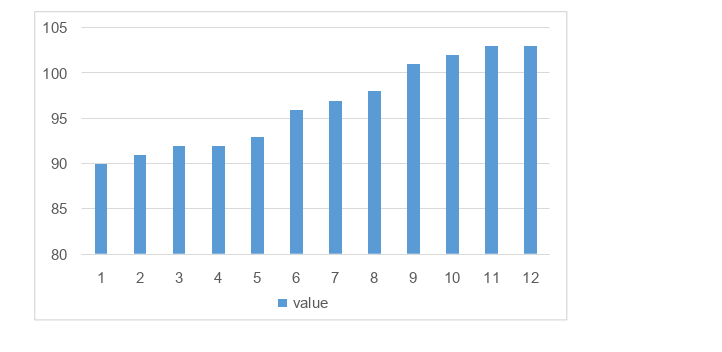
i want to know if its possible to do the same but in tabular form like the 2nd picture via plugins.

Obs.: both of this pictures are double clickable and open a little spreasheet to be edited
Thanks.
---
### Author:  [@Constantine](https://community.onlyoffice.com/u/Constantine)
#### Post date: [7 July 2025 10:24 UTC](https://community.onlyoffice.com/t/programmatically-insert-spreadsheet-in-document/15223/2 "2025-07-07T10:24:27Z")
Hello @edlacer
I am verifying the possibility to interact with table editor in document editor similarly to Insert \> Table \> Insert Spreadsheet, but from plugin. Please await my feedback.
---
### Author:  [@edlacer](https://community.onlyoffice.com/u/edlacer)
#### Post date: [14 July 2025 12:52 UTC](https://community.onlyoffice.com/t/programmatically-insert-spreadsheet-in-document/15223/4 "2025-07-14T12:52:45Z")
Hello @Constantine, any updates on this?
As an alternative i been checking out the ApiTable documentation and i found this method
[AddElement](https://api.onlyoffice.com/docs/office-api/usage-api/text-document-api/ApiTable/Methods/AddElement/) but it seems to only be able to receive one cell at a time.
Im wondering now if i can create a table with CreateTable and feed the data i want in a matrix.
---
### Author:  [@Alexandre](https://community.onlyoffice.com/u/Alexandre)
#### Post date: [16 July 2025 12:45 UTC](https://community.onlyoffice.com/t/programmatically-insert-spreadsheet-in-document/15223/5 "2025-07-16T12:45:07Z")
Hello @edlacer
We have added enhancement to internal tracksystem for the described scenario. Thank you for pointing us to this situation!
We will update this thread once this feature is released.