# On Device 'Open Folder' removed in Android v8.2.2
**URL:** https://community.onlyoffice.com/t/on-device-open-folder-removed-in-android-v8-2-2/11883
**Category:** Mobile apps
**Tags:** android, suggestion
**Created:** [9 December 2024 03:23 UTC](https://community.onlyoffice.com/t/on-device-open-folder-removed-in-android-v8-2-2/11883 "2024-12-09T03:23:36Z")
**Posts on this page:** 12
**Page:** 1
### Author:  [@kjdfngrt](https://community.onlyoffice.com/u/kjdfngrt)
#### Post date: [9 December 2024 03:23 UTC](https://community.onlyoffice.com/t/on-device-open-folder-removed-in-android-v8-2-2/11883/1 "2024-12-09T03:23:36Z")
ONLYOFFICE Mobile: Documents
On Device _open-from-folder_ capability appears to have been removed in v8.2.2. Is there any additional guidance or rationale available around this change?
Am inferring the alternative suggested method is `Import File` via the UI’s “+” menu. This appears to create/store/duplicate documents in an app cache, rather than editing the file on the file system. Personally have no desire to use (any) cloud service and so I sync phone documents via p2p with other network devices. This pattern is now broken, because the file on the device filesystem is not actually updated. Attempting to use the menu’s `move` feature creates a new ‘copy’ file on the drive because there’s a name collision with the file that’s there (the one I wanted to edit directly) with OO. Basically a mess.
Any possibility this change might be reversed? This is the exact reason that I left WPS Office. Switching back to v8.2.0 for now.
Device: Samsung S20
OS version: 13
App version: 8.2.2
Mode: On Device
---
### Author:  [@userOO](https://community.onlyoffice.com/u/userOO)
#### Post date: [9 December 2024 21:10 UTC](https://community.onlyoffice.com/t/on-device-open-folder-removed-in-android-v8-2-2/11883/2 "2024-12-09T21:10:45Z")
at least tell us why develepors removed “open from folder” button because it’s much better then “Import File” creating a duplicate in cache
---
### Author:  [@Constantine](https://community.onlyoffice.com/u/Constantine)
#### Post date: [10 December 2024 12:29 UTC](https://community.onlyoffice.com/t/on-device-open-folder-removed-in-android-v8-2-2/11883/4 "2024-12-10T12:29:23Z")
Hello @kjdfngrt, @userOO
I am checking out this decision and I will provide a feedback.
In the meantime, as far as I know, you still can open documents from local storage directly from it with _Open in_ or similar option. Do I understand that your usage scenario was about opening the files directly from Documents app, for instance, from the list of recent files?
**UPD:** I was informed that the issue with missing plus sign to add files from local storage is a known issue. It planned to be brought back to the toolbar in next major version. Anyway, I will inform you once the version with fix is released.
---
### Author:  [@userOO](https://community.onlyoffice.com/u/userOO)
#### Post date: [10 December 2024 14:25 UTC](https://community.onlyoffice.com/t/on-device-open-folder-removed-in-android-v8-2-2/11883/5 "2024-12-10T14:25:14Z")
thank you for reply, so we have to wait 9.x version? There is an ETA how many months we have to wait?
---
### Author:  [@kjdfngrt](https://community.onlyoffice.com/u/kjdfngrt)
#### Post date: [11 December 2024 01:32 UTC](https://community.onlyoffice.com/t/on-device-open-folder-removed-in-android-v8-2-2/11883/6 "2024-12-11T01:32:18Z")
Thank you for the response and the update.
Only since you happened to specifically mention the “plus” button… For clarity, the functionality I was referring to is/was the “folder” icon previously available, which opened access to the actual device filesystem. The “plus” sign only ever seems to have provided the “import” functionality, which has the app cache / duplication issue mentioned previously.
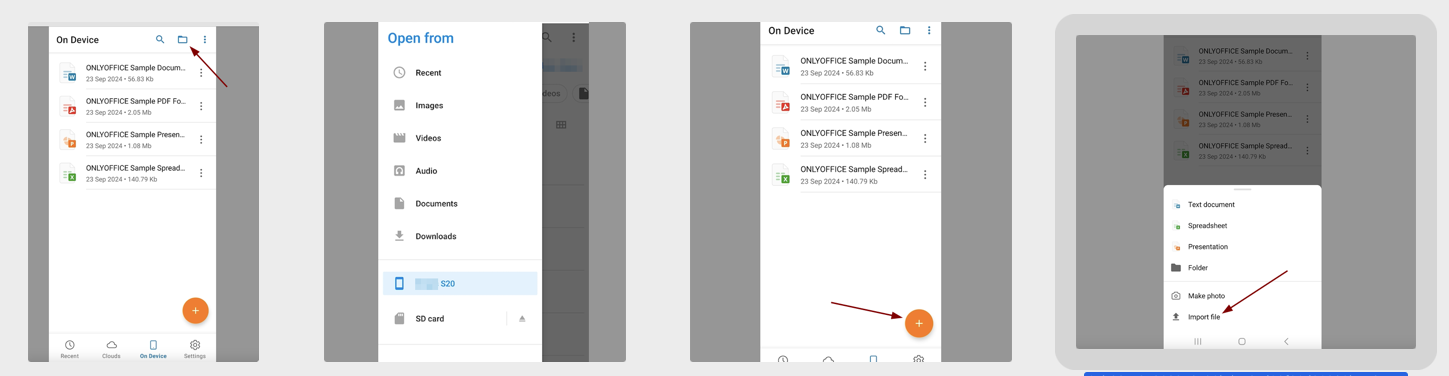
Might be in a minority, but for me the direct file access was a _make-or-break_ feature. Thanks for considering bringing it back. Please let us know.
Thanks.
---
### Author:  [@Constantine](https://community.onlyoffice.com/u/Constantine)
#### Post date: [11 December 2024 09:22 UTC](https://community.onlyoffice.com/t/on-device-open-folder-removed-in-android-v8-2-2/11883/7 "2024-12-11T09:22:49Z")
Thanks for the feedback @kjdfngrt. I, indeed, understand. You still can utilize approach I’ve mentioned too:
> [@Constantine](#):
>
> In the meantime, as far as I know, you still can open documents from local storage directly from it with _Open in_ or similar option.
* * *
As for @userOO’s question: I was referring to 8.3 mostly. I don’t have exact timeline, but I believe it is about a couple of months tops. Anyway, I will keep you posted.
---
### Author:  [@kjdfngrt](https://community.onlyoffice.com/u/kjdfngrt)
#### Post date: [11 December 2024 11:34 UTC](https://community.onlyoffice.com/t/on-device-open-folder-removed-in-android-v8-2-2/11883/8 "2024-12-11T11:34:24Z")
[EDIT] Hi @Constantine ,
Thanks for the follow-ups. Appreciated. But there still seems to be confusion re: current and future-state. Again, for clarity, my understanding:
- Currently (v8.3.2, Android) there **is no** _Open in_ or similar functionality
- Last version that supported that _Open in_ (“folder” icon) function was 8.2.0
- There is some tentative plan to bring back the _Open in_ / system “folder” functionality in…
- (?) next _major_ release 9.x.x? (Timeline: unknown)
- (?) next _minor_ release 8.3.x? (Timeline: couple months)
- Interim workaround is to use the document _Import_ function ( **not** the same as file open), with the limitations discussed in this thread.
Just trying to get on the same page.
Thanks again.
---
### Author:  [@Constantine](https://community.onlyoffice.com/u/Constantine)
#### Post date: [12 December 2024 11:06 UTC](https://community.onlyoffice.com/t/on-device-open-folder-removed-in-android-v8-2-2/11883/9 "2024-12-12T11:06:16Z")
> [@kjdfngrt](#):
>
> Currently (v8.3.2, Android) there **is no** _Open in_ or similar functionality
This is a temporary measure. It is planned to bring it back in next release.
> [@kjdfngrt](#):
>
> - Last version that supported that _Open in_ (“folder” icon) function was 8.2.0
This is correct.
> [@kjdfngrt](#):
>
> There is some tentative plan to bring back the _Open in_ / system “folder” functionality in…
>
> - (?) next _major_ release 9.x.x? (Timeline: unknown)
> - (?) next _minor_ release 8.3.x? (Timeline: couple months)
In 8.3 as I mentioned. I will keep you posted about the progress.
> [@kjdfngrt](#):
>
> Interim workaround is to use the document _Import_ function ( **not** the same as file open), with the limitations discussed in this thread.
You still should be able to use _Open in_ from the folder directly to open and edit files with Documents Mobile app.
Sorry if my wording is confusing.
---
### Author:  [@kjdfngrt](https://community.onlyoffice.com/u/kjdfngrt)
#### Post date: [12 December 2024 15:39 UTC](https://community.onlyoffice.com/t/on-device-open-folder-removed-in-android-v8-2-2/11883/10 "2024-12-12T15:39:11Z")
Hi @Constantine,
The grammar finally clicked. You mean opening with the phone’s (Android) **filesystem** app “Open **With** /Open In” menu…
Yes, thanks that _is_ a workaround in the interim.
Appreciate the back & forth. Thanks again.
---
### Author:  [@Constantine](https://community.onlyoffice.com/u/Constantine)
#### Post date: [24 February 2025 09:05 UTC](https://community.onlyoffice.com/t/on-device-open-folder-removed-in-android-v8-2-2/11883/11 "2025-02-24T09:05:13Z")
Hello again @kjdfngrt, @userOO
New version of the Documents App was released. Please update it on your devices and check out earlier discussed issues of this topic.
---
### Author:  [@kjdfngrt](https://community.onlyoffice.com/u/kjdfngrt)
#### Post date: [25 February 2025 00:26 UTC](https://community.onlyoffice.com/t/on-device-open-folder-removed-in-android-v8-2-2/11883/12 "2025-02-25T00:26:39Z")
Hi @Constantine,
In Android 8.3.0 I am again seeing the filesystem ‘folder’ icon within the On Device section, and am able to open files from the filesystem navigator menu that opens from there.
This addresses all of my originally reported issues. Thanks so much to you and the team for tackling this!!
---
### Author:  [@Constantine](https://community.onlyoffice.com/u/Constantine)
#### Post date: [27 February 2025 07:53 UTC](https://community.onlyoffice.com/t/on-device-open-folder-removed-in-android-v8-2-2/11883/13 "2025-02-27T07:53:29Z")
Thanks for the feedback, I am glad to hear it.