# Installation issue
**URL:** https://community.onlyoffice.com/t/installation-issue/20320
**Category:** Docs
**Tags:** how-to-question, linux, install
**Created:** [19 July 2026 17:05 UTC](https://community.onlyoffice.com/t/installation-issue/20320 "2026-07-19T17:05:46Z")
**Posts on this page:** 5
**Page:** 1
### Author:  [@clemens](https://community.onlyoffice.com/u/clemens)
#### Post date: [19 July 2026 17:05 UTC](https://community.onlyoffice.com/t/installation-issue/20320/1 "2026-07-19T17:05:46Z")
Hello,
I have issue with onlyoffice document server install in Debian 12.
I can open welcome page, but when active test page get error (screen shoot attached)
Can’t connect to nextcloud too, healthcheck problem
Please, any help will be appreciated. Thank you
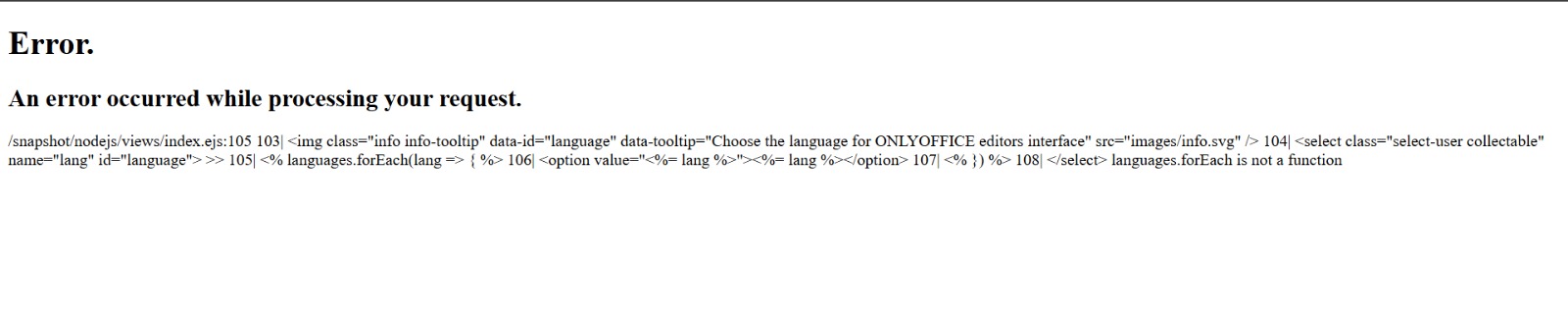
---
### Author:  [@Nurullo](https://community.onlyoffice.com/u/Nurullo)
#### Post date: [23 July 2026 14:03 UTC](https://community.onlyoffice.com/t/installation-issue/20320/2 "2026-07-23T14:03:31Z")
Hi @clemens, welcome to the community!
Before we dig in — how did you install it? Did you follow the official Debian/Ubuntu deb guide ([Installing ONLYOFFICE Docs for Debian, Ubuntu, and derivatives](https://helpcenter.onlyoffice.com/docs/installation/docs-community-install-ubuntu.aspx)), or would you prefer to try Docker via the [automatic install script](https://helpcenter.onlyoffice.com/docs/installation/docs-community-install-script-linux.aspx)? Docker is usually the fastest way to get a clean working install if you’re starting fresh.
---
### Author:  [@Nurullo](https://community.onlyoffice.com/u/Nurullo)
#### Post date: [23 July 2026 14:03 UTC](https://community.onlyoffice.com/t/installation-issue/20320/3 "2026-07-23T14:03:55Z")
Also — for the Nextcloud side: how are you trying to connect it?
---
### Author:  [@clemens](https://community.onlyoffice.com/u/clemens)
#### Post date: [28 July 2026 00:40 UTC](https://community.onlyoffice.com/t/installation-issue/20320/4 "2026-07-28T00:40:26Z")
Thank you for your response
I start with docker, auto script, manual cli install and snap. All same result, try uninstall other software that maybe port conflict, still same. My os debian bookworm on x86 64 bit machine.
I connect nextcloud through nextcloud page, it got health check issue.
My other machine with almost same specification running normal, maybe I miss in some config ? Copied all step from 1st machine, but 2nd machine not success.
Or maybe I miss to install some requirement module ?
---
### Author:  [@Nurullo](https://community.onlyoffice.com/u/Nurullo)
#### Post date: [3 August 2026 07:53 UTC](https://community.onlyoffice.com/t/installation-issue/20320/5 "2026-08-03T07:53:37Z")
Hi @clemens,
The welcome page renders from nginx alone, but `/example` and `/healthcheck` both depend on the DS backend services. Both failing together — plus 4 install methods behaving identically on this machine while the twin machine works — points at host-level state rather than the installer.
To save a round-trip, could you send all of the following from the failing machine in one go:
```auto
sudo systemctl status ds-docservice ds-converter ds-metrics nginx --no-pager
sudo ss -tlnp | grep -E ':(80|8000|8080|5432|5672|6379|3000)\b'
curl -v http://127.0.0.1:8000/healthcheck
```
Plus an archive of the entire `/var/log/onlyoffice/documentserver/` folder (external link is fine if it’s over the ~14.6 MB forum limit).
That should be enough to spot the cause in one look.