# Help with Nextcloud version 29.0.7
**URL:** https://community.onlyoffice.com/t/help-with-nextcloud-version-29-0-7/10847
**Category:** Connectors
**Tags:** how-to-question
**Created:** [26 September 2024 19:54 UTC](https://community.onlyoffice.com/t/help-with-nextcloud-version-29-0-7/10847 "2024-09-26T19:54:00Z")
**Posts on this page:** 2
**Page:** 1
### Author:  [@bigus189](https://community.onlyoffice.com/u/bigus189)
#### Post date: [26 September 2024 19:54 UTC](https://community.onlyoffice.com/t/help-with-nextcloud-version-29-0-7/10847/1 "2024-09-26T19:54:01Z")
Hello,
I am new to the community, so I apologize if I haven’t created the ticket in the correct section.
I am learning about Nextcloud, and I have deployed a new server with Ubuntu 22.04. I installed Snap, and from there I installed Nextcloud using `snap install nextcloud`.
So far, Nextcloud is working perfectly; I can upload and download files.
The issue arises when I installed ONLYOFFICE for editing files in the cloud:
- ONLYOFFICE Version 9.4.0
- Community Document Server: Version 0.1.18
It is important to clarify that I installed ONLYOFFICE Version 9.4.0 and Community Document Server Version 0.1.18 directly from the Nextcloud apps.
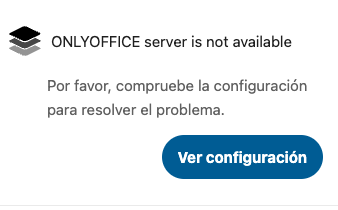
The error that appears (attached screenshot): **ONLYOFFICE server is not available** Please check the configuration to resolve the issue.
After a few hours without moving the server or making changes, this announcement appears and ONLYOFFICE disconnects, which prevents me from continuing to edit files in the cloud. I have to go to the apps and save to reactivate it.
This happens several times a day. How can I resolve or determine what is stopping ONLYOFFICE?
Thank you for your valuable help.
---
### Author:  [@Constantine](https://community.onlyoffice.com/u/Constantine)
#### Post date: [1 October 2024 07:50 UTC](https://community.onlyoffice.com/t/help-with-nextcloud-version-29-0-7/10847/2 "2024-10-01T07:50:24Z")
Hello @bigus189
Please check out this topic about this app:
> [@Community Document Server app in Nextcloud 18](https://forum.onlyoffice.com/t/community-document-server-app-in-nextcloud-18/268):
>
> Dear ONLYOFFICE users! On January, 17th, 2020 our partners from Nextcloud announced the release of Nextcloud Hub with a limited version of ONLYOFFICE Document Server (Community Edition) integrated by default: [https://apps.nextcloud.com/apps/documentserver\_community](https://apps.nextcloud.com/apps/documentserver_community) The server code was partially rewritten in PHP by Nextcloud developers. Known issues of this app (v0.1.2): no conversion service no command service (only ‘version’ command) no spellchecking issues with adding fonts n…
In a few words - Community Document Server app was developed by Nextlcloud team and it is maintained by them. If you want to connect [ONLYOFFICE Docs](https://www.onlyoffice.com/office-suite.aspx) to your portal, then it must be installed separately. You can find installation scripts here:
> **[Installation Guides - Docs Community Edition - ONLYOFFICE](https://helpcenter.onlyoffice.com/installation/docs-community-index.aspx)**
>
> ONLYOFFICE Installation Guides - ONLYOFFICE Docs Community Edition.
In other scenario, you should contact devs of this app on Nextcloud forum instead to get help with this issue.