# Feedback and Suggestions Regarding AI Plugin Integration
**URL:** https://community.onlyoffice.com/t/feedback-and-suggestions-regarding-ai-plugin-integration/15099
**Category:** AI
**Tags:** suggestion
**Created:** [27 June 2025 16:36 UTC](https://community.onlyoffice.com/t/feedback-and-suggestions-regarding-ai-plugin-integration/15099 "2025-06-27T16:36:19Z")
**Posts on this page:** 9
**Page:** 1
### Author:  [@Yassine](https://community.onlyoffice.com/u/Yassine)
#### Post date: [27 June 2025 16:36 UTC](https://community.onlyoffice.com/t/feedback-and-suggestions-regarding-ai-plugin-integration/15099/1 "2025-06-27T16:36:19Z")
**Hey OnlyOffice Team**
_As suggested, I’m moving this little wishlist over here where it belongs (thank you for the gentle nudge)._
> [@Integration with local AI services](https://community.onlyoffice.com/t/integration-with-local-ai-services/10126/35):
>
> I am kindly asking you to start new topic with these suggestions to process them accordingly
Below are some fun complaints, wild ideas, and hopeful suggestions for improving the AI plugin.
Feel free to laugh, cry, or forward them to a developer brave enough to deal with my brain.
Alright, here we go!
- **Make That UI Friendlier, Please**
First things first: when we want to add a custom AI and its local address, the UI feels like… well, a secret club. It’s not obvious that you can just type anything and point to a local model… unless you love trawling forums like a nerd.
This is also an answer for our friend @gNovap :
> [@Integration with local AI services](https://community.onlyoffice.com/t/integration-with-local-ai-services/10126/32):
>
> Unable to succeed (OnlyOffice issues a “Failed to fetch” error, whereas the Local-Ai webUI loads normally from my browser).
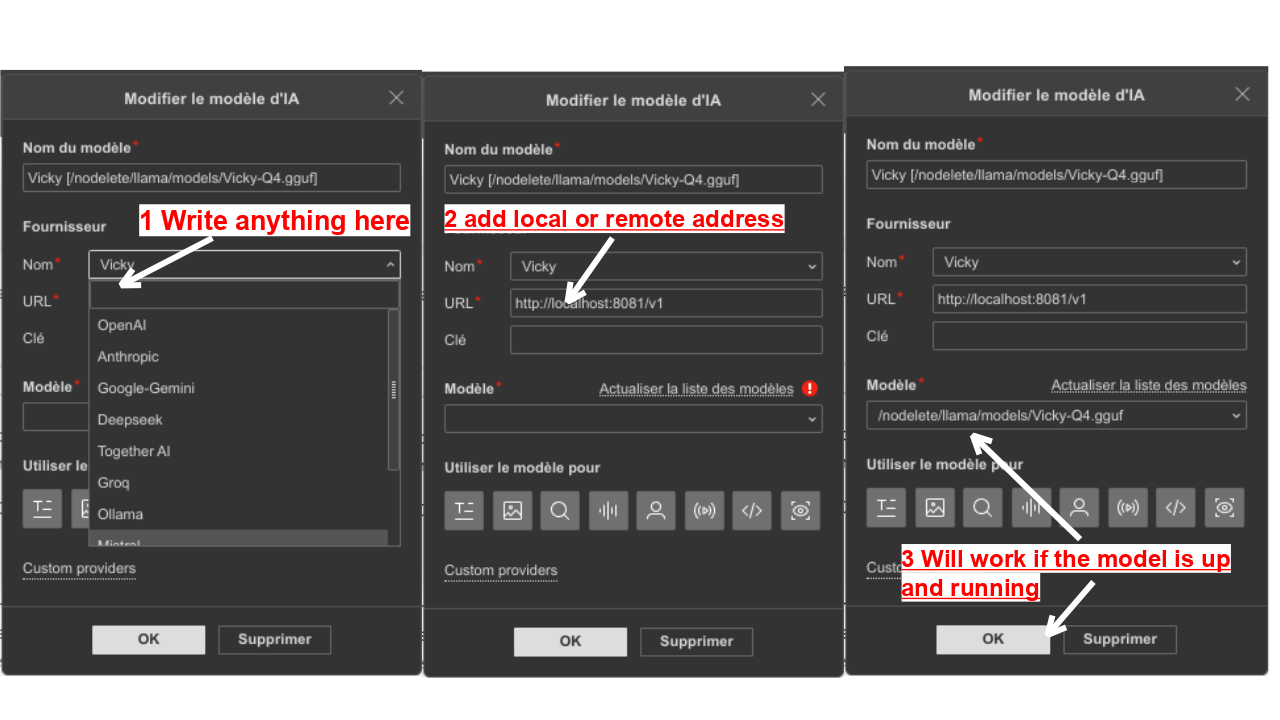
**Ps:** _This is not a suited for a secure connection, my method is purely for **testing** and playing with my tiny models._
Let’s make it super obvious that we can add whatever AI we like… Just so I can be happy.
More suggestions coming below, brace yourselves.
- **Let Us Tweak Prompts (Pretty Please?)**
Here’s one for my fellow control freaks: let us edit the prompts that power “expand,” “write,” “summarize,” etc. Why?
Because not all of us have a mighty 70B AI brain… some of us are chilling with tiny 3B models that sometimes answer in Klingon when we want French. Being able to say “_summarize this like a math equation_” or “_pretend you’re an alien_” would be so much fun!
And hey, if my little AI accidentally responds in English instead of French… a custom prompt would save the day. Trust me, my model isn’t dumb… just delightfully stubborn.
- **Don’t Slam the Door When the Internet Dips**
Imagine this: you invoke AI without realizing the internet is down and _poof!_ Your doc disappears faster than my patience in a traffic jam.

(Here the spooky error screenshot so we can all scream together.)
Could we maybe do a quick connection check before calling the AI? That way, if there’s no signal, we get a polite “Hey, try again later” instead of a forced close.
And for those of us working in caves like happy bats (or on a remote local address), this would seriously help.
- **Chat Window Enhancement Suggestion**
Would be great if the AI chat could glide up/down like facebook chat do! One click to slide it into view, another to slide it down and out of the way, _without losing chat history_.
It’s not a huge problem, since we can still work while it’s open, but this would just _look_ and _feel_ better. A small tweak with a big aesthetic impact!
- **A Cancel Button?**
And last… could we please have a way to cancel AI prompts mid-run? You know, like a “Stop” button you’d see on any decent AI interface. I mean, come on… who doesn’t like having an emergency brake?
And if you ever integrate llama.cpp directly into the app (I know, I know… different protocol, different magic), I bet this would fit right in.
That’s it for my wild wishlist! Thanks for bearing with me and my tiny-model troubles… you guys rock, and I can’t wait to see what’s next!
---
### Author:  [@Alexandre](https://community.onlyoffice.com/u/Alexandre)
#### Post date: [30 June 2025 13:42 UTC](https://community.onlyoffice.com/t/feedback-and-suggestions-regarding-ai-plugin-integration/15099/2 "2025-06-30T13:42:01Z")
Hello @Yassine
What a review!
Thank you for your ideas, however let’s sum them up and check whether I understood them correctly:
- **Make That UI Friendlier, Please**
You need pop-up messages which explain what data could be filled out on the ‘Add AI model’ setting page.
- **Let Us Tweak Prompts (Pretty Please?)**
Do I understand it right that you want the ability to add custom prompts here?

- **Don’t Slam the Door When the Internet Dips**
This one wasn’t clear to me. I’ve tried to reproduce the situation by shutting down my Wi-Fi router while adding a model, but the editing file was still OK. If you can record a video file of your actions, it would be appreciated.
- **Chat Window Enhancement Suggestion**
Could you please show step-by-step what the desired behavior looks like?
I’ve tried pin-unpin chat, but all things were OK. But indeed, the chat history disappears once it it closed. Do you mean this scenario?
- **A Cancel Button?**
Agreed. Please give us a some to internal discussion.
> And if you ever integrate llama.cpp directly into the app (I know, I know… different protocol, different magic), I bet this would fit right in.
Do you mean this one? [GitHub - ggml-org/llama.cpp: LLM inference in C/C++](https://github.com/ggml-org/llama.cpp)
---
### Author:  [@Yassine](https://community.onlyoffice.com/u/Yassine)
#### Post date: [1 July 2025 04:50 UTC](https://community.onlyoffice.com/t/feedback-and-suggestions-regarding-ai-plugin-integration/15099/4 "2025-07-01T04:50:02Z")
**Hey again, OnlyOffice Team!**
Thanks a lot for the detailed reply; I really appreciate the time you took to go through my chaotic list of suggestions 😅
I have put together some clarifications and follow-ups for each point below. Hopefully, this clears things up a bit and maybe even sparks a few new ideas!
> [@Alexandre](#):
>
> **Make That UI Friendlier, Please**
> You need pop-up messages which explain what data could be filled out on the ‘Add AI model’ setting page.
Exactly… It a small detail, but one that can completely change how people feel, they will have better experience… when you give users just a hint of guidance especially those newer generations that getting into this each year and for their first time.
I mean! for example! have you seen the Gentoo documentations? This is an OS mainly for hard core geeks right? yet… their documentation treat you like you just got struck by lightning and woke up in a terminal… step by step, zero assumptions,… It’s like being taught how to make a five-star dish by a chef who _assumes you’ve never held a spoon_.
I like to call it: **“People won’t feel neglected.”**
And honestly? This principle doesn’t just apply to the AI plugin… it’s something that could apply to the entire OnlyOffice experience.
> [@Alexandre](#):
>
> **Let Us Tweak Prompts (Pretty Please?)**
> Do I understand it right that you want the ability to add custom prompts here?
**Hummm No!** (and yes maybe!) I explain…
Here on the OnlyOffice GitHub page: _(yeah, I went full detective mode)_
“[onlyoffice.github.io/sdkjs-plugins/content/ai/scripts/engine/library.js at master · ONLYOFFICE/onlyoffice.github.io · GitHub](https://github.com/ONLYOFFICE/onlyoffice.github.io/blob/master/sdkjs-plugins/content/ai/scripts/engine/library.js)”
From the line 467 to 540, we read:
> **Click to expand**
>
> ```auto
> getFixAndSpellPrompt(content) {
> let prompt = `I want you to act as an editor and proofreader. \
> I will provide you with some text that needs to be checked for spelling and grammar errors. \
> Your task is to carefully review the text and correct any mistakes, \
> ensuring that the corrected text is free of errors and maintains the original meaning. \
> Only return the corrected text. \
> Here is the text that needs revision: \"${content}\"`;
> return prompt;
> },
> getSummarizationPrompt(content, language) {
> let prompt = "Summarize the following text. ";
> if (language) {
> prompt += "and translate the result to " + language;
> prompt += "Return only the resulting translated text.";
> } else {
> prompt += "Return only the resulting text.";
> }
> prompt += "Text: \"\"\"\n";
> prompt += content;
> prompt += "\n\"\"\"";
> return prompt;
> },
> getTranslatePrompt(content, language) {
> let prompt = "Translate the following text to " + language;
> prompt += ". Return only the resulting text.";
> prompt += "Text: \"\"\"\n";
> prompt += content;
> prompt += "\n\"\"\"";
> return prompt;
> },
> getExplainPrompt(content) {
> let prompt = "Explain what the following text means. Return only the resulting text.";
> prompt += "Text: \"\"\"\n";
> prompt += content;
> prompt += "\n\"\"\"";
> return prompt;
> },
> getTextLongerPrompt(content) {
> let prompt = "Make the following text longer. Return only the resulting text.";
> prompt += "Text: \"\"\"\n";
> prompt += content;
> prompt += "\n\"\"\"";
> return prompt;
> },
> getTextShorterPrompt(content) {
> let prompt = "Make the following text simpler. Return only the resulting text.";
> prompt += "Text: \"\"\"\n";
> prompt += content;
> prompt += "\n\"\"\"";
> return prompt;
> },
> getTextRewritePrompt(content) {
> let prompt = "Rewrite the following text differently. Return only the resulting text.";
> prompt += "Text: \"\"\"\n";
> prompt += content;
> prompt += "\n\"\"\"";
> return prompt;
> },
> getTextKeywordsPrompt(content) {
> let prompt = `Get Key words from this text: "${content}"`;
> return prompt;
> },
> getExplainAsLinkPrompt(content) {
> let prompt = "Give a link to the explanation of the following text. Return only the resulting link.";
> prompt += "Text: \"\"\"\n";
> prompt += content;
> prompt += "\n\"\"\"";
> return prompt;
> },
> getImageDescription() {
> return "Describe in detail everything you see in this image. Mention the objects, their appearance, colors, arrangement, background, and any noticeable actions or interactions. Be as specific and accurate as possible. Avoid making assumptions about things that are not clearly visible."
> },
> getImagePromptOCR() {
> return "Extract all text from this image as accurately as possible. Preserve original reading order and formatting if possible. Recognize tables and images if possible. Do not add or remove any content. Output recognized objects in md format if possible. If not, return plain text.";
> }
> };
>
> ```
we can see the default prompts… all written in English.
Now, I’m not saying that’s “_wrong…_.” but here’s the issue: when you pass French (or any other language) into a small model that’s prompted in English… _confusion happens_.
Here’s the deal:
- Tiny models perform much better when prompts are clear and in the same language.
- Bigger models will benefit too… clarity always helps.
**My suggestion:**
Let us edit these system prompts from the UI. Just simple customization, plus a handy “restore to default” button in case we mess things up too much 😅
something like that:

Why it matters:
- It gives users freedom to adapt the AI to their projects, languages, or wild ideas.
- No more blaming the dev team when we want AI to do weird things like summarize a paragraph in pirate speak.
**About the “_yes maybe_” Part:**
Yes, having a **custom prompt input** would be AMAZING. Think about it:
- “Count how many A’s are in this text.”
- “Scatter the sentences randomly.” (_Something that Teachers like to torture their students with_)
- “Summarize this as a math problem.”
- “Translate to Klingon.” (_Instant student exodus!_ 😆)
Hum… how about you select a text, hit _Custom Prompt_, and voilà! **a text field opens** where you can type anything. That’s power. That’s creativity. That’s chaos we all secretly crave.
> [@Alexandre](#):
>
> If you can record a video file of your actions, it would be appreciated.
Sure thing! Here’s the video:
I _tried_ to add captions explaining each step, but let’s just say… video editing is not my superpower 😅
So here’s a quick breakdown of what you’re seeing:
1. First, I switch to an **online model** … in this case, Gemini 1.5 Flash (_which Google claims is an 8B model_)
2. I run a **summary prompt** on a French text… as expected, the result comes out in English. (Told ya, default prompts strike again 😜)
3. Then I **disconnect from the LAN** run same exact prompt… and bam! A proud, mighty error pops up and forces me to save and close the document.
4. Reconnect and everything is just cool…
**Important note:**
If the opened document _hasn’t been modified_, clicking “OK” on the error instantly closes it… no warning, no fuss, just _vanished_. It’s not about losing edits, it’s just… gone.
That’s what gave me the jump scare, not the data loss.
This doesn’t _really_ bother me personally… but I figured: if I found it, someone else might hit it too. And maybe there’s a way to handle it more gracefully… like a gentle message saying “connection lost” instead of full-on doc closure.
Just throwing it out there in case it helps someone _not_ panic 😅
> [@Alexandre](#):
>
> **Chat Window Enhancement Suggestion**
> Could you please show step-by-step what the desired behavior looks like?
**Okay _plot twist time!_** 😄
In your video, I noticed the chat panel appears as a **sidebar** on the screen. That’s amazing, because in my case, it shows up as a **floating window**
And honestly? That’s the _only_ reason I suggested making it behave more like Facebook Chat… with a click to slide up/down behavior instead of “close,” just to avoid losing the conversation history.
But now… I’m curious… how to _switch_ between the floating chat and the sidebar view? I totally missed it 😅 an anchored window like on your video will prevent us from accidentally wiping the chat history by clicking “close”.
Either way, it looks like you’ve already covered it, and I love it. here my idea:

> [@Alexandre](#):
>
> Do you mean this one? [GitHub - ggml-org/llama.cpp: LLM inference in C/C++](https://github.com/ggml-org/llama.cpp)
Yes… _exactly!_ That’s the one powering those spicy little gguf models.
I know there are tools like **LM Studio** out there, but it tends to be heavier than it needs to be…
Now, integrating **llama.cpp** directly would open the door to some really exciting things… especially control over **LLM parameters** like the _system prompt_, temperature, and other juicy bits.
To be fair, most of my use cases are just for tinkering and testing (you know, breaking things for fun 😅), but still… having that level of access baked into OnlyOffice could really set the plugin apart.
**And That’s a Wrap!**
Thanks again for going through all my points… I know it’s a lot, but it all comes from a place of curiosity, enthusiasm, and way too much free time 😄
If any of these ideas find their way into a feature update someday, just know I’ll be somewhere in Algeria doing a happy dance next to my desk.
Can’t wait to see what comes next. Keep being awesome 💖
---
### Author:  [@Alexandre](https://community.onlyoffice.com/u/Alexandre)
#### Post date: [3 July 2025 09:16 UTC](https://community.onlyoffice.com/t/feedback-and-suggestions-regarding-ai-plugin-integration/15099/5 "2025-07-03T09:16:56Z")
Hello @Yassine
Thank you for the provided details!
These suggestions are under internal review:
- pop-up messages with hints on the model addition settings page;
- adding the ability to change Prompts;
- adding support for llama.cpp model
For these points I will contact you as soon as we have something to share;
As for the ‘Cancel button’ for the AI chat, we have added your suggestion to internal tracksystem, and we have started working on it. I will update this thread once this feature is released.
As for the error message once the connection is interrupted, so far it seems to be the expected behavior. The editor allows to save the file once such this issue occurs. Probably I misunderstood the point, and I would appreciate the details on the desired behavior in this case.
As for the ‘Chat Window Enhancement Suggestion’, there’s a button in the chat window to pin it:

---
### Author:  [@Yassine](https://community.onlyoffice.com/u/Yassine)
#### Post date: [3 July 2025 18:12 UTC](https://community.onlyoffice.com/t/feedback-and-suggestions-regarding-ai-plugin-integration/15099/6 "2025-07-03T18:12:20Z")
**Hello again!**
Turns out I’ve been time traveling from an older plugin version… 😅 Looks like some of my chaos has already been tamed by your updates… props to the devs!
- The error message on connection loss? Already fixed in version 2.3.2.
- That chat window behavior? You nailed it in 2.2.4.
Sooo… I guess I owe you all a tiny apology.
Sorry for poking at things that were already patched… and thank you for being so patient with my feedback 😅
---
### Author:  [@Alexandre](https://community.onlyoffice.com/u/Alexandre)
#### Post date: [7 July 2025 07:43 UTC](https://community.onlyoffice.com/t/feedback-and-suggestions-regarding-ai-plugin-integration/15099/7 "2025-07-07T07:43:06Z")
We are glad that some requests are resolved already. As for those that are still under review, I will update this thread as soon as possible.
---
### Author:  [@Alexandre](https://community.onlyoffice.com/u/Alexandre)
#### Post date: [9 July 2025 10:55 UTC](https://community.onlyoffice.com/t/feedback-and-suggestions-regarding-ai-plugin-integration/15099/8 "2025-07-09T10:55:30Z")
Hello @Yassine
A few more words about your suggestions
- pop-up messages with hints on the model addition settings page;
This one is already planned for implementation. I believe we can expect it in one of the next plugin versions.
- adding the ability to change Prompts;
- adding support for llama.cpp model
These two suggestions are interesting. We have added it to internal tracksystem, and have started working on them. Right now I cannot provide guarantees about their implementations or how they will be implemented. However we will update this thread once we have something to share.
It seems we checked all your ideas here. If something slipped my mind, please feel free to point it out. I want to thank you again for your enthusiasm!
---
### Author:  [@Yassine](https://community.onlyoffice.com/u/Yassine)
#### Post date: [9 July 2025 16:00 UTC](https://community.onlyoffice.com/t/feedback-and-suggestions-regarding-ai-plugin-integration/15099/10 "2025-07-09T16:00:37Z")
Hey @Alexandre 😊
You said:
> [@Alexandre](#):
>
> If something slipped my mind, please feel free to point it out.
Well… just a teeny tiny sprinkle of chaos you might’ve missed:
**Custom Prompt Input.**
Not just tweaking existing ones, but the wild idea of selecting text and writing anything as a prompt… right there in a magic box. Something like:
- “Generate an image based on this text.”
- “Translate to Elvish and add a dramatic pause.”
- “Read this in potato language.”
- “Summarize like you’re in a courtroom drama.”
> [@Yassine](#):
>
> how about you select a text, hit _Custom Prompt_, and voilà! **a text field opens** where you can type anything.
You know… that kind of freedom. 😁
Just making sure that little nugget didn’t get lost in the brainstorming tornado!
Thanks again, you have been awesome with all the replies!
---
### Author:  [@Alexandre](https://community.onlyoffice.com/u/Alexandre)
#### Post date: [15 July 2025 11:51 UTC](https://community.onlyoffice.com/t/feedback-and-suggestions-regarding-ai-plugin-integration/15099/11 "2025-07-15T11:51:59Z")
Hello @Yassine
> [@Yassine](#):
>
> **Custom Prompt Input.**
>
> Not just tweaking existing ones, but the wild idea of selecting text and writing anything as a prompt… right there in a magic box. Something like:
>
> - “Generate an image based on this text.”
> - “Translate to Elvish and add a dramatic pause.”
> - “Read this in potato language.”
> - “Summarize like you’re in a courtroom drama.”
Thank you for the additional details! I do believe that we’re on the same page right now.
I will update this thread once we have something to share.