Hi,
Here is one idea for improvement to make the spreadsheet more user-friendly and useful.
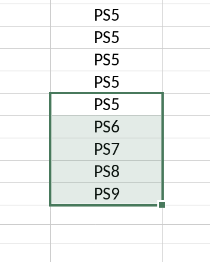
When dragging the cell to other cells it does a nice job increasing the number as Excel does but with the difference that in excel it also gives you the option to copy only. Here i don’t get the same option. I tried to find it but didnt succeed. It would be great if there could be a popup that could give the user the option to simply copy which is what i wanted in my example. I dont want the fields to increase but just copy the date to other cells.
Hello,
You can actually press Ctrl key and drag, then the cell value will be copied
1 Like
Cool, its a nice shortcut but as new user this is hidden, maybe a popup or something for new users when you drag the first time?
I did not find any menu with these short keys, maybe i missed it?
All the key actions are described in this guide - Spreadsheet Editor - Keyboard shortcuts (this one specifically is described in Modifying Objects section → Create a copy when dragging. We will review the suggestion to add this popup
1 Like
Thank you. Just as a suggestion, for usability, it would be awesome if there was a pop-up like in regular excel with this, and option to copy only or increase. Makes this and other things similar much easier for users.
We’ve registered the feature suggestion in our tracking system and will inform you as soon as a version with this feature is released
1 Like