# Connect OnlyOffice to a free Nextcloud/Collabora server
**URL:** https://community.onlyoffice.com/t/connect-onlyoffice-to-a-free-nextcloud-collabora-server/16139
**Category:** Cloud
**Tags:** nextcloud
**Created:** [6 September 2025 20:08 UTC](https://community.onlyoffice.com/t/connect-onlyoffice-to-a-free-nextcloud-collabora-server/16139 "2025-09-06T20:08:52Z")
**Posts on this page:** 5
**Page:** 1
### Author:  [@theking2](https://community.onlyoffice.com/u/theking2)
#### Post date: [6 September 2025 20:08 UTC](https://community.onlyoffice.com/t/connect-onlyoffice-to-a-free-nextcloud-collabora-server/16139/1 "2025-09-06T20:08:52Z")
when I click the + at Clouds and enter my server url and select Nextcloud it does not connect (I see a blank window) and at the server I see
```auto
full URI: /web-apps/apps/api/documents/worker/ready/?desktop=true| wsd/ClientRequestDispatcher.cpp:1235
wsd-00001-00030 2025-09-06 22:07:54.815381 +0200 [websrv_poll] WRN #30: Unknown resource: /status.php G, host: collab.kingma.ch, path: 1
[0] 'status.php'
full URI: /status.php| wsd/ClientRequestDispatcher.cpp:1235
wsd-00001-00030 2025-09-06 22:07:54.915332 +0200 [websrv_poll] WRN #30: Unknown resource: /?desktop=true G, host: collab.kingma.ch, path: 1
[0] 'desktop=true'
full URI: /?desktop=true| wsd/ClientRequestDispatcher.cpp:1235
```
what is the proper url to connect only office to a collabora/nextcloud server?
---
### Author:  [@Alexandre](https://community.onlyoffice.com/u/Alexandre)
#### Post date: [10 September 2025 10:33 UTC](https://community.onlyoffice.com/t/connect-onlyoffice-to-a-free-nextcloud-collabora-server/16139/2 "2025-09-10T10:33:15Z")
Hello @theking2
Do you use the desktop app? What version is it? I’ve checked connect to Nextcloud server and it works with URL as [https://mydomainname/](https://mydomainname/)
Also please clarify the Nextcloud version.
If I misunderstood the request, please clarify it.
---
### Author:  [@theking2](https://community.onlyoffice.com/u/theking2)
#### Post date: [12 September 2025 08:40 UTC](https://community.onlyoffice.com/t/connect-onlyoffice-to-a-free-nextcloud-collabora-server/16139/3 "2025-09-12T08:40:27Z")
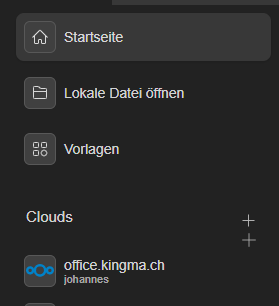
It is very interesting. On some only office installations (windows and f42) I have my nextcloud instance available under Clouds. on others nothing happens there when I open my nextcloud url.
Is it enough to just add [https://office](https://office)․kingma․ch or should I add more to the nextcloud url?
Where are these stored in the Windows profile or ~ folder?
---
### Author:  [@theking2](https://community.onlyoffice.com/u/theking2)
#### Post date: [13 September 2025 10:25 UTC](https://community.onlyoffice.com/t/connect-onlyoffice-to-a-free-nextcloud-collabora-server/16139/4 "2025-09-13T10:25:03Z")
lets continue this here: [Add nextcloud permanently - #8 by Alexandre](https://community.onlyoffice.com/t/add-nextcloud-permanently/15429/8)
---
### Author:  [@Alexandre](https://community.onlyoffice.com/u/Alexandre)
#### Post date: [18 September 2025 09:04 UTC](https://community.onlyoffice.com/t/connect-onlyoffice-to-a-free-nextcloud-collabora-server/16139/5 "2025-09-18T09:04:06Z")