# Connction to Nextcloud, no SSL, no DNS
**URL:** https://community.onlyoffice.com/t/connction-to-nextcloud-no-ssl-no-dns/11477
**Category:** Connectors
**Tags:** solved
**Created:** [11 November 2024 07:29 UTC](https://community.onlyoffice.com/t/connction-to-nextcloud-no-ssl-no-dns/11477 "2024-11-11T07:29:53Z")
**Posts on this page:** 20
**Page:** 1
### Author:  [@Ev4ld](https://community.onlyoffice.com/u/Ev4ld)
#### Post date: [11 November 2024 07:29 UTC](https://community.onlyoffice.com/t/connction-to-nextcloud-no-ssl-no-dns/11477/1 "2024-11-11T07:29:53Z")
Hi there, i’m trying to set up nextcloud server connected to the on premise community onlyoffice document server on local LAN.
I did try docker, as well as separate ubuntu servers. Nextcloud works fine, docserver healthcheck also is true. Even connectivity from nextcloud to doc server checked with Curl looks OK.
I was trying to use self signed certificates as well as just http, since those server will not be available from outside of the LAN. There is no DNS, so I’m using either localhost or private IP.
Problem is of course when I try to connect to the doc server from nextcloud settings there is usually error: error when trying to connect (error occurred in the document service: error while downloading the document file to be converted.) (version 8.2.0.143).
I’ve watched a dozen of tutorials, read official doc., nothing helps.
Maybe anybody here had successfully connected on premise onlyoffice doc server to nextcloud with self signed SSL or without SSL and can share some config tips or files like nextcloud config.php or onlyoffice local.json? Is setup like this even possible?
---
### Author:  [@Roman](https://community.onlyoffice.com/u/Roman)
#### Post date: [12 November 2024 14:18 UTC](https://community.onlyoffice.com/t/connction-to-nextcloud-no-ssl-no-dns/11477/2 "2024-11-12T14:18:43Z")
You can disable certificate validation in the Nextcloud connector settings by using the option “disable certificate validation.”
A link to all configuration parameters and explanations is provided below:
> **[Integration. Getting Started. OwnCloud - ONLYOFFICE](https://helpcenter.onlyoffice.com/integration/gettingstarted-owncloud.aspx#Configure_block)**
>
> Integrate ONLYOFFICE with ownCloud cloud storage service
To disable certificate verification by DocumentServer, change the rejectUnauthorized parameter in the configuration file default.json from true to false.
The file is located at:
Linux: /etc/onlyoffice/documentserver/default.json
Windows: C:\Program Files\ONLYOFFICE\DocumentServer\config\default.json
If these instructions don’t help, you can send a screenshot with the errors, and we’ll try to troubleshoot further.
---
### Author:  [@Ev4ld](https://community.onlyoffice.com/u/Ev4ld)
#### Post date: [21 November 2024 15:32 UTC](https://community.onlyoffice.com/t/connction-to-nextcloud-no-ssl-no-dns/11477/3 "2024-11-21T15:32:52Z")
thanks for your answer.
so far I found this working setup: [GitHub - ONLYOFFICE/docker-onlyoffice-nextcloud](https://github.com/ONLYOFFICE/docker-onlyoffice-nextcloud) , but it doesn’t use ssl encryption. I tried to adjust nginx.conf, but when nextcloud is accessed using SSL, communication with onlyoffice stops working (Error when trying to connect (Mixed Active Content is not allowed. HTTPS address for ONLYOFFICE Docs is required.)) I tried to set upself signed certs for onlyoffice, still no success even after changing the rejectUnauthorized parameter…
---
### Author:  [@anon801025](https://community.onlyoffice.com/u/anon801025)
#### Post date: [21 November 2024 18:48 UTC](https://community.onlyoffice.com/t/connction-to-nextcloud-no-ssl-no-dns/11477/4 "2024-11-21T18:48:11Z")
Hello there.
What you are describing is nothing unusual. If you have a working Nextcloud server/service and your Onlyoffice service is also accessible (welcome page) and responds to a healthcheck query, you must have some minor configuration issue here.
If your Onlyoffice service is not exposed to public access, use http first. Personally I would set up a docker container. It is much easier to setup, manage and later to update/downgrade. Use a non standard port to expose the service on your host and set up the parameter to allow unauthorized storage like suggested by @Roman (check the ENV-Attributes of the docker for the exact name). That should be it. All you need now is the IP of your host running Onlyoffice and the exposed non standard port from your compose file, a secret key passphrase of your choosing and the correct authorization header (I use AuthorizationJwt). Configure the connector app inside Nextcloud accordingly. Enter the IP and port, the secret key and disable certificate verification. As long as your service is accessible from any client/your local lan, it should work.
If you still have problems, it would be best you show us the configuration you use. Your compose file and the details you have set up in your connector app. Make sure to obscure sensitive data if necessary.
[EDIT]
Also don’t forget to add your Onlyoffice host to “trusted\_domains” in your Nextcloud configuration.
---
### Author:  [@Ev4ld](https://community.onlyoffice.com/u/Ev4ld)
#### Post date: [22 November 2024 11:00 UTC](https://community.onlyoffice.com/t/connction-to-nextcloud-no-ssl-no-dns/11477/5 "2024-11-22T11:00:36Z")
hi, it looks like I’ve got the connection with ssl working. But when openning documents i’m getting: “ONLYOFFICE cannot be reached. Please contact admin” here is log: [2024-11-22T10:17:52.931] [ERROR] [localhost] [4291082219] [userId] nodeJS - error downloadFile:url=[http://192.168.1.228/index.php/apps/onlyoffice/download?doc=eyJ0eXAiOiJKV1QiLCJhbGciOiJIUzI1NiJ9.eyJhY3Rpb24iOiJkb3dubG9hZCIsImZpbGVJZCI6NTQsInVzZXJJZCI6ImV2YWxkIn0.gb8lUwhhhA7g60Q2seJIAXYBJVwOABXbr\_oGqlaQiSI;attempt=1;code:ECONNRESET;connect:null](http://192.168.1.228/index.php/apps/onlyoffice/download?doc=eyJ0eXAiOiJKV1QiLCJhbGciOiJIUzI1NiJ9.eyJhY3Rpb24iOiJkb3dubG9hZCIsImZpbGVJZCI6NTQsInVzZXJJZCI6ImV2YWxkIn0.gb8lUwhhhA7g60Q2seJIAXYBJVwOABXbr_oGqlaQiSI;attempt=1;code:ECONNRESET;connect:null) Error: socket hang up
at connResetException (node:internal/errors:692:14)
at Socket.socketOnEnd (node:\_http\_client:478:23)
at Socket.emit (node:events:539:35)
at endReadableNT (node:internal/streams/readable:1345:12)
at processTicksAndRejections (node:internal/process/task\_queues:83:21)
Any ideas why?
---
### Author:  [@anon801025](https://community.onlyoffice.com/u/anon801025)
#### Post date: [22 November 2024 11:30 UTC](https://community.onlyoffice.com/t/connction-to-nextcloud-no-ssl-no-dns/11477/6 "2024-11-22T11:30:12Z")
Hello.
What is running on the host 192.168.1.228 on port 80?
[EDIT]
SSL runs on port 443 and is usually referred by “https”. The error indicates, that you are trying to reach a host on 192.168.1.228 via http, thus no SSL.
---
### Author:  [@Ev4ld](https://community.onlyoffice.com/u/Ev4ld)
#### Post date: [22 November 2024 11:58 UTC](https://community.onlyoffice.com/t/connction-to-nextcloud-no-ssl-no-dns/11477/7 "2024-11-22T11:58:51Z")
this is host IP of nextcloud and onlyoffice containers, so as I understood it tries to reach nextcloud through http for some reasons. Despite me setting "Server address for internal requests from ONLYOFFICE Docs: at [https://192.168.1.228](https://192.168.1.228)…
---
### Author:  [@anon801025](https://community.onlyoffice.com/u/anon801025)
#### Post date: [22 November 2024 12:26 UTC](https://community.onlyoffice.com/t/connction-to-nextcloud-no-ssl-no-dns/11477/8 "2024-11-22T12:26:20Z")
Do you have a reverse proxy running too? How do you separate your services?
It would be best if you could share your configuration.
[EDIT]
If you have NC and OO running as docker containers, do you run them in the same network stack? This should be done this way. Then you should use the container name as host name to address them in the connector app (under internal addresses) and not IP.
---
### Author:  [@Ev4ld](https://community.onlyoffice.com/u/Ev4ld)
#### Post date: [22 November 2024 12:32 UTC](https://community.onlyoffice.com/t/connction-to-nextcloud-no-ssl-no-dns/11477/9 "2024-11-22T12:32:33Z")
here is nginx.conf
```auto
user www-data;
worker_processes 1;
error_log /var/log/nginx/error.log warn;
pid /var/run/nginx.pid;
events {
worker_connections 1024;
}
http {
upstream backend {
server app-server:9000; # Nextcloud PHP backend
}
upstream onlyoffice {
server onlyoffice-document-server:80; # ONLYOFFICE backend
}
include /etc/nginx/mime.types;
default_type application/octet-stream;
log_format main '$remote_addr - $remote_user [$time_local] "$request" '
'$status $body_bytes_sent "$http_referer" '
'"$http_user_agent" "$http_x_forwarded_for"';
access_log /var/log/nginx/access.log main;
sendfile on;
keepalive_timeout 65;
server {
listen 443 ssl;
server_name 192.168.1.228; # IP address for the server
ssl_certificate /etc/nginx/ssl/nextcloud.crt;
ssl_certificate_key /etc/nginx/ssl/nextcloud.key;
add_header Strict-Transport-Security "max-age=15768000; includeSubDomains; preload;";
add_header X-Content-Type-Options nosniff;
add_header X-XSS-Protection "1; mode=block";
add_header X-Robots-Tag none;
add_header X-Download-Options noopen;
add_header X-Permitted-Cross-Domain-Policies none;
root /var/www/html;
client_max_body_size 10G;
fastcgi_buffers 64 4K;
gzip off;
index index.php;
error_page 403 /core/templates/403.php;
error_page 404 /core/templates/404.php;
rewrite ^/.well-known/carddav /remote.php/dav/ permanent;
rewrite ^/.well-known/caldav /remote.php/dav/ permanent;
location = /robots.txt {
allow all;
log_not_found off;
access_log off;
}
location ~ ^/(build|tests|config|lib|3rdparty|templates|data)/ {
deny all;
}
location ~ ^/(?:\.|autotest|occ|issue|indie|db_|console) {
deny all;
}
location / {
rewrite ^/remote/(.*) /remote.php last;
rewrite ^(/core/doc/[^\/]+/)$ $1/index.html;
try_files $uri $uri/ =404;
}
location ~ \.php(?:$|/) {
fastcgi_split_path_info ^(.+\.php)(/.+)$;
include fastcgi_params;
fastcgi_param SCRIPT_FILENAME $document_root$fastcgi_script_name;
fastcgi_param PATH_INFO $fastcgi_path_info;
fastcgi_param HTTPS on;
fastcgi_param modHeadersAvailable true;
fastcgi_pass backend;
fastcgi_intercept_errors on;
}
location ~* \.(?:css|js)$ {
add_header Cache-Control "public, max-age=7200";
access_log off;
}
location ~* \.(?:jpg|jpeg|gif|bmp|ico|png|swf)$ {
access_log off;
}
# Proxy ONLYOFFICE
location /ds-vpath/ {
rewrite /ds-vpath/(.*) /$1 break;
proxy_pass http://onlyoffice-document-server; # Connect to ONLYOFFICE container
proxy_redirect off;
client_max_body_size 100m;
proxy_http_version 1.1;
proxy_set_header Upgrade $http_upgrade;
proxy_set_header Connection "upgrade";
proxy_set_header Host $host;
proxy_set_header X-Real-IP $remote_addr;
proxy_set_header X-Forwarded-For $proxy_add_x_forwarded_for;
proxy_set_header X-Forwarded-Proto $scheme;
}
}
}
```
here is docker-compose:
```auto
version: '3'
services:
app:
container_name: app-server
image: nextcloud:fpm
restart: always
expose:
- '80'
- '9000'
volumes:
- app_data:/var/www/html
onlyoffice-document-server:
container_name: onlyoffice-document-server
image: onlyoffice/documentserver:latest
restart: always
environment:
- JWT_SECRET=secret
expose:
- '80'
- '443'
volumes:
- document_data:/var/www/onlyoffice/Data
- document_log:/var/log/onlyoffice
nginx:
container_name: nginx-server
image: nginx
restart: always
ports:
- 80:80
- 443:443
volumes:
- ./nginx.conf:/etc/nginx/nginx.conf
- app_data:/var/www/html
- ./ssl:/etc/nginx/ssl
volumes:
document_data:
document_log:
app_data:
mysql_data:
```
---
### Author:  [@anon801025](https://community.onlyoffice.com/u/anon801025)
#### Post date: [22 November 2024 12:39 UTC](https://community.onlyoffice.com/t/connction-to-nextcloud-no-ssl-no-dns/11477/10 "2024-11-22T12:39:14Z")
What are you connector app settings? You have “/ds-vpath/” configured in your reverse-proxy configuration. Do you use it as address to your OO service in the connector app?
This is how your connector app should look like, based on your configuration:
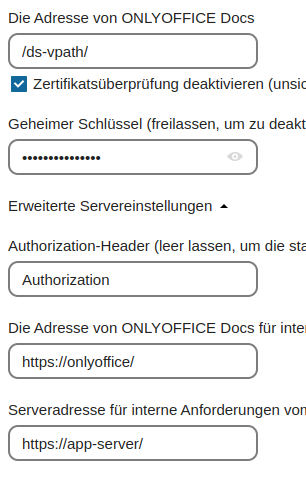
But I would ask you to change “Authorization” to “AuthorizationJwt”.
Do it also in your compose file, add this to environment:
```auto
JWT_HEADER=AuthorizationJwt
USE_UNAUTHORIZED_STORAGE=true
```
[EDIT]
Sorry, [https://onlyoffice/](https://onlyoffice/) in connector app should be [https://onlyoffice-document-server/](https://onlyoffice-document-server/) in your case.
Also make sure “onlyoffice-document-server” is included in your nextcloud config under “trusted\_domains”.
---
### Author:  [@Ev4ld](https://community.onlyoffice.com/u/Ev4ld)
#### Post date: [22 November 2024 14:53 UTC](https://community.onlyoffice.com/t/connction-to-nextcloud-no-ssl-no-dns/11477/11 "2024-11-22T14:53:55Z")
here is what is set.
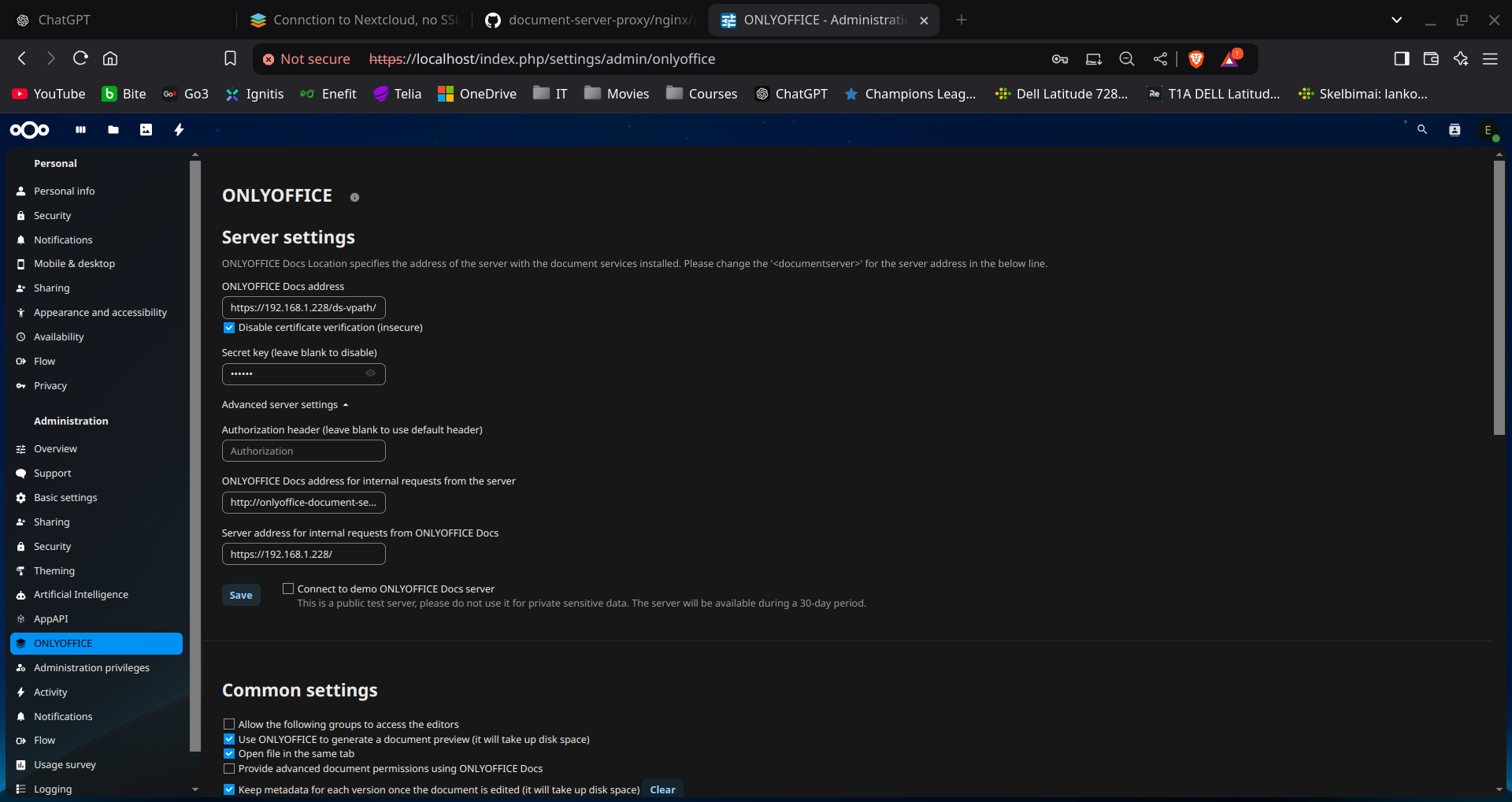
it connect to onlyoffice, but then error “ONLYOFFICE cannot be reached. Please contact admin” comes when trying to edit documents.
JWT\_HEADER=AuthorizationJwt
USE\_UNAUTHORIZED\_STORAGE=true where to add those? to onlyoffice? Maybe I can add them in some config file inside of onlyoffice?
---
### Author:  [@anon801025](https://community.onlyoffice.com/u/anon801025)
#### Post date: [22 November 2024 15:24 UTC](https://community.onlyoffice.com/t/connction-to-nextcloud-no-ssl-no-dns/11477/12 "2024-11-22T15:24:47Z")
Hello.
Yes, your configuration is very messy. Edit your compose file like this:
```auto
# your config
environment:
- JWT_SECRET=secret
# add this
- JWT_HEADER=AuthorizationJwt
- USE_UNAUTHORIZED_STORAGE=true
```
Check and add (if not already done) “onlyoffice-document-server” to your nextcloud config as trusted\_domain.
Your connect app should look like this:
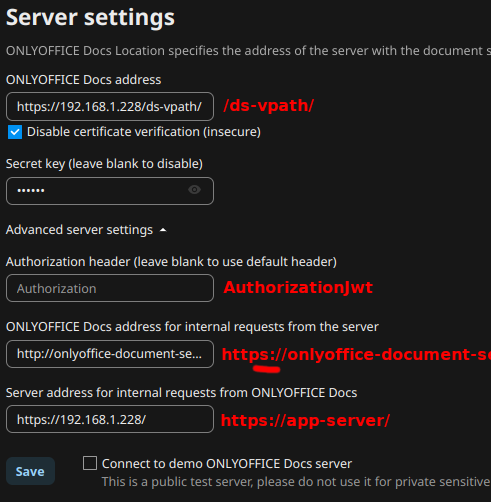
Do I understand it correctly, that you are running everything on your desktop pc?
If so, there are way better ways to do this.
---
### Author:  [@Ev4ld](https://community.onlyoffice.com/u/Ev4ld)
#### Post date: [22 November 2024 15:26 UTC](https://community.onlyoffice.com/t/connction-to-nextcloud-no-ssl-no-dns/11477/13 "2024-11-22T15:26:59Z")
yes, it is Kubuntu PC with docker.
---
### Author:  [@anon801025](https://community.onlyoffice.com/u/anon801025)
#### Post date: [22 November 2024 15:40 UTC](https://community.onlyoffice.com/t/connction-to-nextcloud-no-ssl-no-dns/11477/14 "2024-11-22T15:40:56Z")
If this is only for your own usage, you could have just used the desktop version and be done with it. Nextcloud with Onlyoffice seems a bit of an overkill, since you don’t intend to have public access anyway.
Set up everything as advised. Also edit your nginx.conf and align the protocol from “http” to “https”:
```auto
# Proxy ONLYOFFICE
location /ds-vpath/ {
rewrite /ds-vpath/(.*) /$1 break;
# Align protocol with your current configuration, from http to https
# proxy_pass http://onlyoffice-document-server;
proxy_pass https://onlyoffice-document-server;
proxy_redirect off;
```
Restart your container and apply the config in connector app. It should connect. Try to open a document.
---
### Author:  [@Ev4ld](https://community.onlyoffice.com/u/Ev4ld)
#### Post date: [22 November 2024 15:42 UTC](https://community.onlyoffice.com/t/connction-to-nextcloud-no-ssl-no-dns/11477/15 "2024-11-22T15:42:21Z")
sure there are better ways, but I need to find out working config for nextcloud and onlyoffice with local addresses and self-signed certificates, and then I would move on to more powerfull machine
---
### Author:  [@anon801025](https://community.onlyoffice.com/u/anon801025)
#### Post date: [22 November 2024 15:46 UTC](https://community.onlyoffice.com/t/connction-to-nextcloud-no-ssl-no-dns/11477/16 "2024-11-22T15:46:36Z")
I see. There are literary millions of howtos about that. It’s not that complicated. Depending on your understanding and knowledge about docker and generally Linux, it still can backfire on you, when your move that stuff to some other machine 😉
---
### Author:  [@Ev4ld](https://community.onlyoffice.com/u/Ev4ld)
#### Post date: [22 November 2024 16:27 UTC](https://community.onlyoffice.com/t/connction-to-nextcloud-no-ssl-no-dns/11477/17 "2024-11-22T16:27:04Z")
still no success:
```auto
[2024-11-22T16:23:12.211] [ERROR] [localhost] [check_2026812702] [userId] nodeJS - error downloadFile:url=https://192.168.1.228/index.php/apps/onlyoffice/empty?doc=eyJ0eXAiOiJKV1QiLCJhbGciOiJIUzI1NiJ9.eyJhY3Rpb24iOiJlbXB0eSJ9.HO8yVThljmrKFAiXsGoWMtnWnjfNFj-idymye3GiplM;attempt=3;code:null;connect:null Error: Error response: statusCode:403; headers:{"server":"nginx/1.27.2","date":"Fri, 22 Nov 2024 16:23:12 GMT","content-type":"text/html; charset=UTF-8","transfer-encoding":"chunked","connection":"keep-alive","x-powered-by":"PHP/8.2.25","set-cookie":["oc_sessionPassphrase=UVW2eb%2BCu%2B87z5%2BwpGzZGCGirI8STUZBdeAsorlybkxf3NGNQlNpKuHVp187rwUEyay%2BbLfT8m1GX0hjVO%2FeQdbnI32oxCS7Pfc3pdDO8GAbQkqMhREA9HRJ05zEbQsH; path=/; secure; HttpOnly; SameSite=Lax"," __Host-nc_sameSiteCookielax=true; path=/; httponly;secure; expires=Fri, 31-Dec-2100 23:59:59 GMT; SameSite=lax","__ Host-nc_sameSiteCookiestrict=true; path=/; httponly;secure; expires=Fri, 31-Dec-2100 23:59:59 GMT; SameSite=strict","ocu31vq8go2c=77042fbee43ddaed0706634a42772f9a; path=/; secure; HttpOnly; SameSite=Lax"],"content-security-policy":"default-src 'self'; script-src 'self' 'nonce-xMuApuxTHjT+tYD96+oEOja/OufJF91/DQ6whQKhTcg='; style-src 'self' 'unsafe-inline'; frame-src *; img-src * data: blob:; font-src 'self' data:; media-src *; connect-src *; object-src 'none'; base-uri 'self';","location":"https://192.168.1.228/"};
at Request.fResponse (/snapshot/server/Common/sources/utils.js)
at Request.emit (node:events:527:28)
at Request.onRequestResponse (/snapshot/server/Common/node_modules/request/request.js:1066:10)
at ClientRequest.emit (node:events:527:28)
at HTTPParser.parserOnIncomingClient (node:_http_client:631:27)
at HTTPParser.parserOnHeadersComplete (node:_http_common:128:17)
at TLSSocket.socketOnData (node:_http_client:494:22)
at TLSSocket.emit (node:events:527:28)
at addChunk (node:internal/streams/readable:315:12)
at readableAddChunk (node:internal/streams/readable:289:9)
at TLSSocket.Readable.push (node:internal/streams/readable:228:10)
at TLSWrap.onStreamRead (node:internal/stream_base_commons:190:23)
```
```auto
Are you sure this is possible to get working with self signed certificates?
```
---
### Author:  [@anon801025](https://community.onlyoffice.com/u/anon801025)
#### Post date: [22 November 2024 17:03 UTC](https://community.onlyoffice.com/t/connction-to-nextcloud-no-ssl-no-dns/11477/18 "2024-11-22T17:03:01Z")
Have you followed all advises? How about your nextcloud config? Is your proxy added to trusted\_proxies? How about trusted\_domains? All set up? This is stuff you will also find in most instructions on the web. But to be sure, you can put your config.php in here.
Yes it is of course possible to run that with self signed certificates. But I also suggested in the beginning to use http first, since you don’t expose anything to the WAN. I myself use letsencrypt with a public domain.
---
### Author:  [@Ev4ld](https://community.onlyoffice.com/u/Ev4ld)
#### Post date: [22 November 2024 17:26 UTC](https://community.onlyoffice.com/t/connction-to-nextcloud-no-ssl-no-dns/11477/19 "2024-11-22T17:26:37Z")
I started with this [GitHub - ONLYOFFICE/docker-onlyoffice-nextcloud](https://github.com/ONLYOFFICE/docker-onlyoffice-nextcloud) . It worked well no ssl in this setup), but when I started adding SSL to this setup things got sideways. I’m trying different options for 4 days now, as well as all your suggestions.
This is the closest I’ve got, because it at least connects to onlyoffice from nextcloud, but fails to download documents. When I try other options, like settings **https:onlyoffice-document-server** for ONLYOFFICE Docs address for internal requests from the server it doesn’t even connect to the server.
Here is current config.php:
```auto
root@931d7433a1f6:/var/www/html/config# cat config.php
'\\OC\\Memcache\\APCu',
'apps_paths' =>
array (
0 =>
array (
'path' => '/var/www/html/apps',
'url' => '/apps',
'writable' => false,
),
1 =>
array (
'path' => '/var/www/html/custom_apps',
'url' => '/custom_apps',
'writable' => true,
),
),
'upgrade.disable-web' => true,
'instanceid' => 'ocut3ixo1m51',
'passwordsalt' => 'PgIboFTSkafQ0jYX/u1LVk18H1TYlV',
'secret' => '+iEykktyUs9soEKtsYLMEYCwHTtXMHjtXoA8dnBdXddsxEXI',
'trusted_domains' =>
array (
0 => '192.168.1.228',
1 => 'nginx-server',
2 => 'onlyoffice-document-server',
),
'datadirectory' => '/var/www/html/data',
'dbtype' => 'sqlite3',
'version' => '30.0.2.2',
'overwrite.cli.url' => 'https://192.168.1.228',
'installed' => true,
'onlyoffice' =>
array (
'DocumentServerUrl' => 'https://192.168.1.228/ds-vpath/',
'DocumentServerInternalUrl' => 'http://onlyoffice-document-server/',
'StorageUrl' => 'https://192.168.1.228/',
'jwt_secret' => 'secret',
),
);
root@931d7433a1f6:/var/www/html/config#
```
current nginx.conf:
```auto
user www-data;
worker_processes 1;
error_log /var/log/nginx/error.log warn;
pid /var/run/nginx.pid;
events {
worker_connections 1024;
}
http {
upstream backend {
server app-server:9000; # Nextcloud PHP backend
}
upstream onlyoffice {
server onlyoffice-document-server:81; # ONLYOFFICE backend
}
include /etc/nginx/mime.types;
default_type application/octet-stream;
log_format main '$remote_addr - $remote_user [$time_local] "$request" '
'$status $body_bytes_sent "$http_referer" '
'"$http_user_agent" "$http_x_forwarded_for"';
access_log /var/log/nginx/access.log main;
sendfile on;
keepalive_timeout 65;
server {
listen 443 ssl;
server_name 192.168.1.228; # IP address for the server
ssl_certificate /etc/nginx/ssl/nextcloud.crt;
ssl_certificate_key /etc/nginx/ssl/nextcloud.key;
add_header Strict-Transport-Security "max-age=15768000; includeSubDomains; preload;";
add_header X-Content-Type-Options nosniff;
add_header X-XSS-Protection "1; mode=block";
add_header X-Robots-Tag none;
add_header X-Download-Options noopen;
add_header X-Permitted-Cross-Domain-Policies none;
root /var/www/html;
client_max_body_size 10G;
fastcgi_buffers 64 4K;
gzip off;
index index.php;
error_page 403 /core/templates/403.php;
error_page 404 /core/templates/404.php;
rewrite ^/.well-known/carddav /remote.php/dav/ permanent;
rewrite ^/.well-known/caldav /remote.php/dav/ permanent;
location = /robots.txt {
allow all;
log_not_found off;
access_log off;
}
location ~ ^/(build|tests|config|lib|3rdparty|templates|data)/ {
deny all;
}
location ~ ^/(?:\.|autotest|occ|issue|indie|db_|console) {
deny all;
}
location / {
rewrite ^/remote/(.*) /remote.php last;
rewrite ^(/core/doc/[^\/]+/)$ $1/index.html;
try_files $uri $uri/ =404;
}
location ~ \.php(?:$|/) {
fastcgi_split_path_info ^(.+\.php)(/.+)$;
include fastcgi_params;
fastcgi_param SCRIPT_FILENAME $document_root$fastcgi_script_name;
fastcgi_param PATH_INFO $fastcgi_path_info;
fastcgi_param HTTPS on;
fastcgi_param modHeadersAvailable true;
fastcgi_pass backend;
fastcgi_intercept_errors on;
}
location ~* \.(?:css|js)$ {
add_header Cache-Control "public, max-age=7200";
access_log off;
}
location ~* \.(?:jpg|jpeg|gif|bmp|ico|png|swf)$ {
access_log off;
}
# Proxy ONLYOFFICE
location /ds-vpath/ {
rewrite /ds-vpath/(.*) /$1 break;
proxy_pass http://onlyoffice-document-server; # Connect to ONLYOFFICE container
proxy_redirect off;
client_max_body_size 100m;
proxy_http_version 1.1;
proxy_set_header Upgrade $http_upgrade;
proxy_set_header Connection "upgrade";
proxy_set_header Host $host;
proxy_set_header X-Real-IP $remote_addr;
proxy_set_header X-Forwarded-For $proxy_add_x_forwarded_for;
proxy_set_header X-Forwarded-Proto $scheme;
}
}
}
```
current compose.yml:
```auto
version: '3'
services:
app:
container_name: app-server
image: nextcloud:fpm
restart: always
expose:
- '80'
- '9000'
volumes:
- app_data:/var/www/html
onlyoffice-document-server:
container_name: onlyoffice-document-server
image: onlyoffice/documentserver:latest
restart: always
environment:
- JWT_SECRET=secret
- JWT_HEADER=AuthorizationJwt
- USE_UNAUTHORIZED_STORAGE=true
expose:
- '81'
- '443'
volumes:
- document_data:/var/www/onlyoffice/Data
- document_log:/var/log/onlyoffice
nginx:
container_name: nginx-server
image: nginx
restart: always
ports:
- 80:80
- 443:443
volumes:
- ./nginx.conf:/etc/nginx/nginx.conf
- app_data:/var/www/html
- ./ssl:/etc/nginx/ssl
volumes:
document_data:
document_log:
app_data:
mysql_data:
```
---
### Author:  [@anon801025](https://community.onlyoffice.com/u/anon801025)
#### Post date: [22 November 2024 18:13 UTC](https://community.onlyoffice.com/t/connction-to-nextcloud-no-ssl-no-dns/11477/20 "2024-11-22T18:13:40Z")
Hello.
You don’t really need https for onlyoffice if it’s not exposed to WAN. But to go for it is just a adjustment and should not make any significant difference to a working setup with http. At least in my head.
Your config.php seems almost ok. You still need to add trusted\_proxies and your nginx-server to that. I think you can figure out how to add that out using the internet 😉 You can take “nginx-server” out from “trusted\_domains” thou. This belongs into trusted\_proxies.
Are you still using IPs in the connector app? I advised you to change that. Inside docker the hosts can be accessed by their container name, hence my proposed switch to “app-server” and such. This is the safe way.
When you switch ports to 81 this also brakes everything I have so far established. If you can’t follow simple instructions I don’t see any point to help you.
Your config is very messy and you won’t make anything work, if you don’t follow instructions to the letter. Setting up Nextcloud, Onlyoffice and a reverse proxy via docker installation is a pretty straight forward procedure and has been described in many blogs / howtos and probably even youtube videos. Follow that and you should be fine. Others have.
[Next page](https://community.onlyoffice.com/t/connction-to-nextcloud-no-ssl-no-dns/11477.md?page=2)